VoIP Integration with Microsoft Teams and Cisco Webex: A Comprehensive Guide to Connecting Calls in Organizations
Organizational communications have evolved rapidly, with Teams and Webex becoming core collaboration platforms alongside traditional telephony. This guide explains how to securely and effectively connect on-premises VoIP with these cloud-based channels and outlines practical integration steps, challenges, and best practices.
خلاصه تخصصی مقاله
Organizational communications have evolved rapidly, with Teams and Webex becoming core collaboration platforms alongside traditional telephony. This guide explains how to securely and effectively connect on-premises VoIP with these cloud-based channels and outlines practical integration steps, challenges, and best practices.
موضوعات اصلی: پشتیبانی شبکه، VoIP، Webex، Microsoft، Teams، داخلی
Why Do Organizations Need VoIP Integration with Teams and Webex?
Today’s enterprise communications go beyond voice calls. Online meetings, video conferences, file sharing, and real-time collaboration are essential. Many organizations run internal VoIP for telephony while using collaboration tools like Microsoft Teams or Cisco Webex for teamwork.
Managing VoIP, collaboration tools, and cloud communications separately can increase complexity, cost, and risk. Integrating VoIP with Teams and Webex allows internal, external, and online communications to be managed from a single platform under the organization’s network control.
This integration can improve productivity, reduce communications costs, and enhance call security. Successful implementation requires understanding SIP configurations, SBC setup, and security policy alignment. Working with professional network support and VoIP specialists can accelerate deployment and prevent future issues such as call drops or SIP errors.
This article presents a step-by-step approach to integrating your VoIP system with Microsoft Teams or Cisco Webex, the challenges involved, and the necessary configurations for achieving high quality and security.
Table of Contents
- Why organizations need VoIP integration with Teams and Webex
- VoIP integration methods for Microsoft Teams
- VoIP integration with Cisco Webex
- Operational recommendations for network managers
- Summary
Key benefits of this integration for organizations
| Benefit | Explanation |
|---|---|
| Cost reductions | Eliminating traditional telephone lines and using organizational SIP trunks for external calls |
| Enhanced call security | TLS/SRTP encryption and protection against SIP Flood attacks |
| Unified user experience | All calls and meetings managed in one environment |
| Centralized management | Network admin can control policies via Admin Center or Control Hub |
| Support for multi-site and remote connectivity | Employees at different offices connect to the organization’s call center via Internet |
This approach not only lowers maintenance and equipment costs but also boosts team productivity and responsiveness to customers.
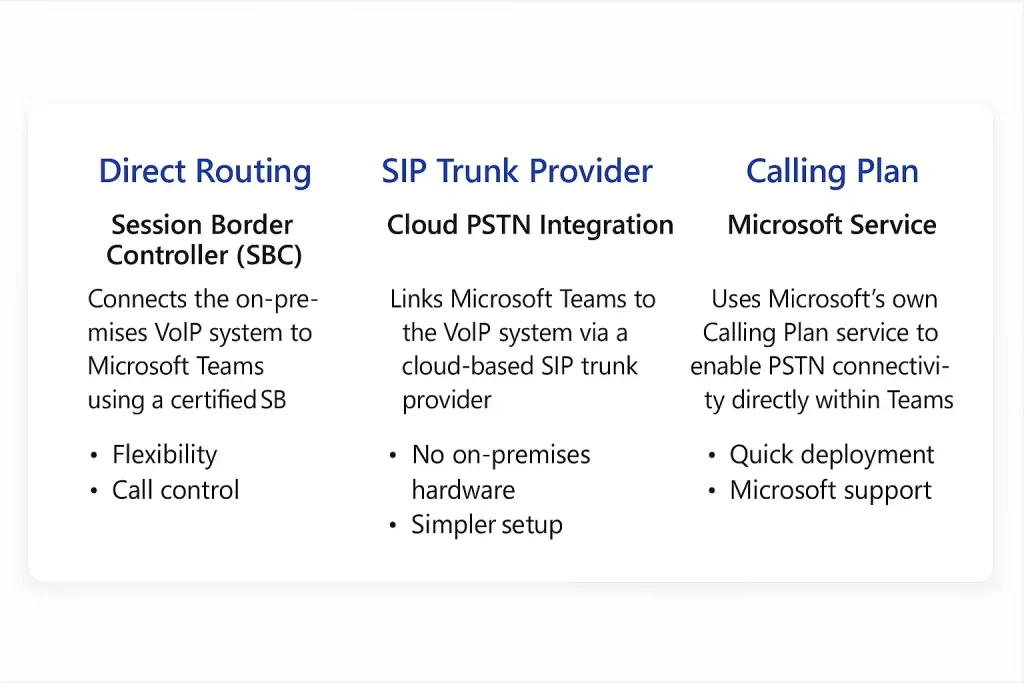
Direct Routing enables organizations to connect their own Session Border Controllers (SBCs) to Microsoft Teams, enabling seamless integration with existing telephony systems and reducing operational complexity.
Connecting VoIP to Microsoft Teams
Microsoft provides standard methods to connect internal VoIP systems (such as Cisco, Asterisk, or FreePBX) to Teams. The aim is to enable two-way calling between the corporate network and Teams users without a full replacement of the telephony infrastructure.
1) Direct Routing (Most common organizational method)
In Direct Routing, the existing telephony system is connected to Teams through a Session Border Controller (SBC). The SBC acts as a security gateway between the Microsoft Cloud and the organization’s telephony network.
Benefits
- Full control over call paths and security policies
- Supports any SIP Trunk or on-prem PBX
- Great flexibility for multi-site deployments
Key configuration points
- The SBC should be Microsoft Certified
- Connection to Teams via TLS/SRTP
- Requires a valid domain and DNS configuration for Session Initiation
2) Connection via SIP Trunk Providers (Cloud PSTN Integration)
Calls connect directly via a SIP trunk provider (e.g., cloud-based services) to Teams. This option is simpler for organizations that do not want to manage an SBC.
Benefits
- No internal hardware required
- Simplified cloud-based management
- Suitable for small to medium-sized organizations
Limitations
- Dependency on Internet quality and provider SLAs
- Limited control over call routing
3) Using Calling Plan (Microsoft telephony service)
Organizations use Microsoft’s Calling Plan, with all outbound calls handled through Microsoft’s cloud infrastructure.
Benefits
- Very quick setup
- No hardware or SBC required
- Full Microsoft support
Drawbacks
- Higher costs at scale
- Limited customization of call routes
- Geographic availability constraints
Table: Comparison of the three main methods
| Connection Method | Level of Control | Need for SBC | Best For | Cost | Security |
|---|---|---|---|---|---|
| Direct Routing | High | Yes | Medium-to-large organizations | Medium | Very high |
| SIP Trunk Provider | Medium | No | Small and cloud-based organizations | Low | High |
| Calling Plan | Low | No | Simple or centralized organizations | High | Very high |
تفاوت Webex Cloud Calling با سیستمهای داخلی VoIP
Webex Calling یکی از گزینههای محبوب برای ایجاد تلفیق ابری با VoIP است. این سرویس دسترسی به تماسهای داخلی و خارجی را بدون تجهیزات سانترال سنتی فراهم میکند و از طریق SIP Trunk و اینترنت امن کار میکند.
Webex Cloud Calling برای سازمانهایی که از زیرساخت VoIP داخلی مانند CUCM استفاده میکنند، امکان ادغام با Webex Cloud Calling را فراهم میکند تا از مزایای کنترل داخلی و امکانات ابری Cisco بهرهمند شوند.
ساختار کلی اتصال VoIP با Webex Calling
- تعریف SIP Trunk بین سرور داخلی و Webex Cloud.
- پیکربندی Dial Plan و Route Pattern برای ترافیک داخلی و Webex.
- تعیین مسیر تماس براساس سیاستهای امنیتی.
- فعالسازی رمزگذاری TLS/SRTP برای امنیت گفتگوها.
تفاوت Webex Cloud Calling با سیستمهای داخلی VoIP
| ویژگی | Webex Cloud Calling | VoIP داخلی (On-Prem) |
|---|---|---|
| نیاز به سختافزار | ندارد | دارد |
| مقیاسپذیری | بالا | محدود به سختافزار |
| امنیت | TLS/SRTP کامل | وابسته به تنظیمات محلی |
| مدیریت | Control Hub | CUCM یا CLI |
| هزینه نگهداری | کمتر | بیشتر |
توصیههای اجرایی برای مدیران شبکه
اجرای ادغام VoIP با Microsoft Teams و Cisco Webex بهصرفه است، اما نیازمند طراحی دقیق، انتخاب تجهیزات سازگار و برنامهریزی برای جلوگیری از Downtime است. با رعایت مسائل امنیتی و مانیتورینگ، میتوان از مزایای این ادغام بهرهمند شد.
در ادامه مهمترین نکتهها ارائه میشوند:
۱. طراحی زیرساخت امن با SBC و VLAN جداگانه
تفکیک ترافیک VoIP از سایر سرویسها به افزایش امنیت و پایایی کمک میکند.
نکات کلیدی
- تخصیص VLAN مخصوص VoIP
- پیادهسازی QoS برای ترجیح ترافیک صوتی
- استفاده از SBC برای کنترل SIP و رمزگذاری ارتباطات
SBC بهعنوان دروازه امنیتی بین شبکه داخلی و خدمات ابری عمل میکند و مدیریت Sessionها و NAT Traversal را تسهیل میکند.
۲. بررسی سازگاری تجهیزات با Microsoft Certified SBC
برای اتصال VoIP داخلی به Teams یا Webex از تجهیزات تأییدشده استفاده کنید. فهرست SBCهای سازگار توسط ارائهدهندگان پلتفرم منتشر میشود.
نمونههای سازگار
- AudioCodes Mediant
- Ribbon EdgeMarc & EdgeView
- Oracle Enterprise SBC
- TE-Systems AnyNode
مزیت استفاده از مدلهای تأییدشده
- پشتیبانی رسمی
- پایداری در ارتباط SIP و TLS
- سهولت در مانیتورینگ و عیبیابی
۳. مستندسازی مسیرهای تماس و مانیتورینگ SLA
مسیرهای تماس باید بهدقت مستندسازی شوند. همچنین SLA کیفیت تماس باید تعریف و با ابزارهای پایش پایدار بررسی شود.
توصیهها
- مستندسازی Call Flow برای هر نوع تماس
- ثبت Dial Plan، Route Group و Trunk
- تعریف MOS ≥ 4، Jitter < 30ms و Packet Loss < 1%
- مانیتورینگ پیوسته با ابزارهایی همچون PRTG یا SolarWinds
۴. همکاری با تیمهای پشتیبانی شبکه برای پیادهسازی بدون Downtime
برای پروژههای چندشعبهای با تجهیزات متنوع، طراحی Zero-Downtime و اجرای همزمان با تیمهای پشتیبانی شبکه الزامی است. این همکاری شامل تحلیل پیش از اجرا، تست Failover و پشتیبانی ۲۴/۷ است.
این همکاری منجر به پیادهسازی مطمئن، مستندسازی کامل و پشتیبانی بلندمدت میشود.
Summary
Integrating VoIP with Microsoft Teams and Cisco Webex is no longer a luxury; it is a necessity for reliability, security, and agility in organizational communications. The integration enables all voice, video, and conferencing to run on a single, secure platform, while preserving existing infrastructures. Whether via Direct Routing, SIP Trunking, or Cloud Calling, organizations can retain control over call paths and leverage cloud benefits. Security is ensured with TLS, SRTP, and certified SBCs. However, improper implementations or lack of documentation can lead to call quality issues. Therefore, collaboration with network support teams and adherence to standards are recommended for successful deployments.