NIC Teaming Performance: VMware ESXi vs Hyper-V
This article compares NIC Teaming implementations in VMware ESXi and Hyper‑V, highlighting configuration, security considerations, and best practices for reliability and load balancing.
خلاصه تخصصی مقاله
This article compares NIC Teaming implementations in VMware ESXi and Hyper‑V, highlighting configuration, security considerations, and best practices for reliability and load balancing.
موضوعات اصلی: پشتیبانی شبکه، امنیت شبکه، مانیتورینگ شبکه، Teaming، NIC، شبکه
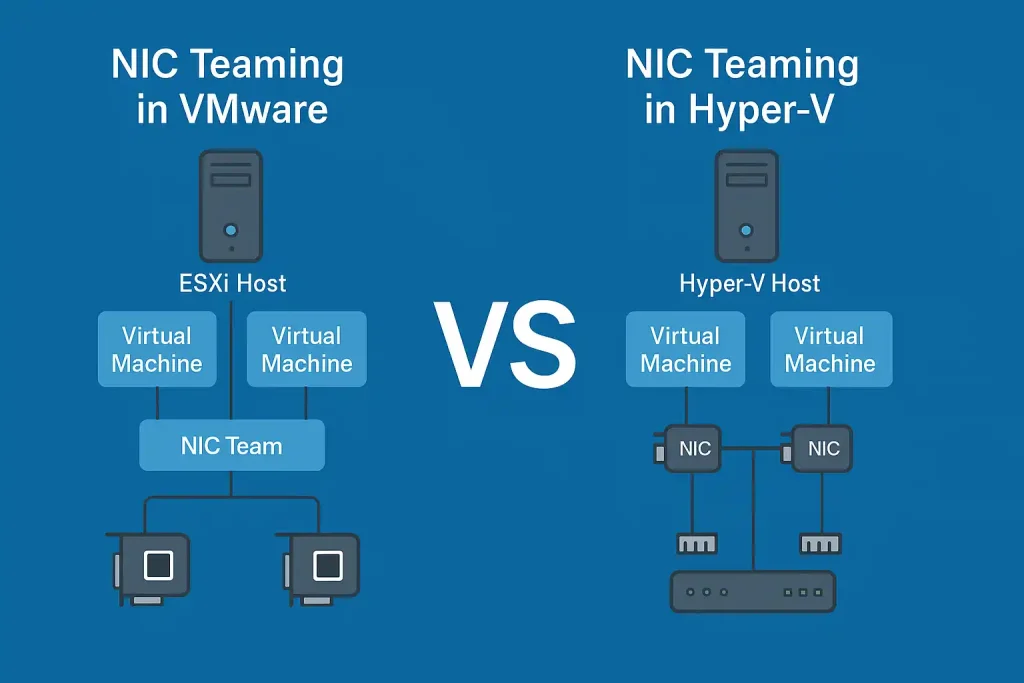
What is NIC Teaming in VMware ESXi?
In VMware ESXi, NIC Teaming is a key capability to ensure high availability and smart load balancing across physical network adapters. It aggregates multiple physical NICs into a single logical team, increasing throughput and protecting against a single NIC failure while optimizing traffic between virtual machines and the physical network.
VMware provides two main switch types: vStandard Switch (vSS) for standalone servers or smaller environments and vDistributed Switch (vDS) for larger environments with centralized control by vCenter.
Load Balancing Methods in VMware
VMware offers several methods to distribute traffic among NICs. Choosing the right method directly affects network performance.
| Method | Description | Recommended Use |
|---|---|---|
| Route based on originating virtual port ID | Default; each virtual port uses a single NIC. | Simple environments or medium workload servers. |
| Route based on IP hash | Distributes traffic based on source and destination IP addresses. | Requires EtherChannel on the physical switch; suitable for high workloads. |
| Route based on source MAC hash | Distributes traffic based on VM MAC address. | When IP hash is not usable. |
| Route based on physical NIC load | Most advanced; VMware automatically redistributes traffic based on NIC load. | Recommended for datacenters with vDS. |
Advantages and Limitations of NIC Teaming in VMware
Advantages
- Automatic traffic distribution across NICs to prevent bottlenecks.
- Automatic failover if a NIC fails.
- Can be combined with vMotion to move VMs without downtime.
- Supports multiple VLAN and trunking scenarios.
Limitations
- Some modes (e.g., IP hash) require specific configurations on the switch.
- In non-managed switches, performance may be limited.
- For maximum performance, use vDS rather than vSS.
VMware recommends using Load Based Teaming (LBT) on vSphere Distributed Switch in multi-host environments; it automatically balances traffic and shifts the active NIC when congestion is detected without manual intervention.
NIC Teaming in Hyper-V: How Does It Work?
In Microsoft Hyper-V the NIC Teaming capability, or Load Balancing and Failover (LBFO), provides higher network availability and load balancing across multiple physical NICs on a virtual server. This feature is natively integrated since Windows Server 2012, requiring no additional drivers or software.
The main goal of NIC Teaming in Hyper-V is to replace a failed NIC quickly so that virtual machine and management traffic remains uninterrupted.
Teaming Modes in Hyper-V
1. Switch Independent Mode
In this mode each NIC connects to the physical switch independently and the server handles load balancing.
- Suitable for environments with unmanaged switches or heterogeneous switches.
- Load balancing is performed on the server side.
2. Switch Dependent Mode
NICs in the team connect to a single switch that must support Static Teaming or LACP.
- Higher throughput for large data transfers or datacenter scenarios.
- Requires coordinated configuration between server and switch.
Load Balancing Options in Hyper-V
| Method | Description | Use Case |
|---|---|---|
| Address Hash | Distributes traffic based on IP and MAC addresses | Varied VM-to-VM communications |
| Hyper-V Port | Each virtual port (vNIC) connects to a specific NIC | Suitable for servers with many VMs |
| Dynamic | Combines the above methods; dynamic decision at runtime | Best for performance and reliability |
Microsoft in newer Windows Server versions (2016 and later) designates Dynamic Load Balancing as the default and recommended mode.
Management Capabilities of NIC Teaming in Hyper-V
- Teams can be created, deleted, or edited via Server Manager or PowerShell using commands such as New-NetLbfoTeam -Name "Team01" -TeamMembers "NIC1","NIC2" -TeamingMode SwitchIndependent -LoadBalancingAlgorithm Dynamic.
- Supports Remote Management and Live Migration in virtual environments.
- NIC status can be monitored with Performance Monitor or Event Viewer.
“NIC Teaming in Windows Server allows multiple network adapters to be placed into a team for the purposes of bandwidth aggregation and traffic failover protection. The Dynamic mode is recommended for optimal load distribution and failover efficiency.”
Microsoft Learn: NIC Teaming Overview
«NIC Teaming in Windows Server allows multiple network adapters to be placed into a team for bandwidth aggregation and traffic failover protection. The Dynamic mode is recommended for optimal load distribution and failover efficiency.»
Microsoft Learn, NIC Teaming in Windows Server
Security Considerations for NIC Teaming
While NIC Teaming aims to improve reliability and performance, misconfiguration can create security and operational risks. Administrators should pay attention to:
1. Risks from incorrect VLAN Tagging
Incorrect VLAN tagging can route traffic into the wrong VLAN and cause data leakage between isolated networks.
Mitigation
- Ensure VLAN tagging is consistent across physical switches, vSwitches, and VM NICs.
- Use isolated VLANs and restrict trunking where appropriate.
2. Looping issues and prevention
With Switch Dependent configurations or EtherChannel/LACP, misconfiguration can create a Network Loop and broadcast storms.
Mitigation
- Enable Spanning Tree Protocol (STP) on switches.
- In VMware, use Route based on physical NIC load to prevent loops.
- In Hyper-V, ensure LACP is correctly configured on both ends if using Switch Dependent mode.
3. Continuous traffic monitoring recommendations
Teaming appears passive but requires ongoing monitoring to detect anomalies or attacks, especially in large virtual environments.
- Use tools such as Performance Monitor or comprehensive network monitoring solutions.
- Define thresholds for traffic volume and NIC errors.
- Review monitoring reports regularly with the network support team.
Best Practices
Implementing NIC Teaming successfully requires careful planning, thorough testing, and proper documentation. Incorrect mode selection or lack of failover testing can jeopardize the entire network. The following best practices help ensure reliability and performance.
Choosing the right mode by switch type
Different environments require different configurations. The table below summarizes VMware and Hyper-V recommendations by switch type.
| Environment | VMware Recommendation | Hyper-V Recommendation | Explanation |
|---|---|---|---|
| Small networks with unmanaged switches | Route based on originated virtual port | Switch Independent | No changes needed on physical switches. |
| Organizations with managed switches | Route based on IP hash (EtherChannel) | Switch Dependent (LACP) | Higher performance but requires switch configuration. |
| Large datacenters | Load Based Teaming (vDS) | Dynamic | Smart automatic distribution of traffic across NICs. |
Note: If the switch supports LACP, enabling it helps achieve more balanced traffic and faster failover.
Failover testing before production
Configuring NIC Teaming without failover testing can be risky since some settings are validated only under real outage conditions.
- Temporarily disable one NIC and verify VM connectivity remains intact.
- Check whether traffic automatically fails over to another NIC.
- In VMware, use esxtop; in Hyper-V, use Performance Monitor to assess failover and load distribution.
RecommendationPerform tests during off-peak hours to avoid disruption of critical services.
Documentation for the network support team
In organizations with multiple network administrators, documenting NIC Teaming configurations is essential.
- Include: Teaming mode, VLAN IDs, MAC policy, and switch settings.
- Record change history in ITSM systems or centralized configuration files.
- Keep a central reference of vCenter/Hyper-V Manager configurations for quick access during faults.
Benefit: Documentation helps the support team rapidly identify and resolve issues.
NIC Teaming is a key capability to increase reliability, performance, and security of virtual networks in enterprise infrastructure. Whether in VMware ESXi or Microsoft Hyper-V, the aim is to create redundancy and prevent service outages during hardware failures or traffic spikes.
In VMware, network administrators have finer control over Load Balancing and traffic policies and can manage centrally through a Distributed Switch. Conversely, Hyper-V integrates more naturally with Windows Server, offering a simpler management experience and strong compatibility with Microsoft environments. The choice between platforms should depend on organization size, network equipment, and IT team expertise.
Finally, while NIC Teaming deployments may seem straightforward, misconfigurations in VLAN, teaming mode, or LACP can cause loops, port conflicts, or degraded network performance. It is advisable to consult with professional network support before applying changes in production to ensure alignment with technical standards.
What is the main objective of NIC Teaming in the network?
NIC Teaming aims to increase network reliability and prevent outages by aggregating bandwidth across multiple NICs, thereby providing higher throughput for virtual machine traffic.
What is the difference between NIC Teaming in VMware and Hyper-V?
In VMware, the network administrator has finer control over Load Balancing methods and traffic settings and can leverage a distributed switch for centralized management. In Hyper-V, configuration is simpler and better integrated with Windows Server, making it a more suitable choice for Microsoft-centric environments.
Which teaming mode is more suitable for higher reliability?
In VMware, Load Based Teaming (LBT) is recommended; in Hyper-V, Dynamic mode is preferred for balanced traffic and fast failover. Both automate traffic distribution across active NICs.
What are the security risks of NIC Teaming?
Incorrect VLAN tagging or LACP configurations can cause traffic leakage across VLANs or create a network loop. Ensure VLAN and switch configurations are aligned and monitor traffic continuously.
Does NIC Teaming affect virtual machine performance?
When configured correctly, NIC Teaming can improve performance and reduce latency; misconfigurations can cause reduced speed or temporary outages.
برای ارزیابی پایداری، امنیت و نگهداری این زیرساخت، راهنمای پشتیبانی شبکه را نیز مطالعه کنید.