Key Differences Between Antivirus and Firewall in System Security
A firewall acts as a smart gate at the network edge, filtering traffic by security rules, while antivirus inspects and removes malware inside the system. For robust protection, both tools are essential and complementary.
خلاصه تخصصی مقاله
A firewall acts as a smart gate at the network edge, filtering traffic by security rules, while antivirus inspects and removes malware inside the system. For robust protection, both tools are essential and complementary.
موضوعات اصلی: پشتیبانی شبکه، امنیت شبکه، فایروال، میکند، آنتیویروس، شبکه
The difference between antivirus and firewall lies in their functional nature. A firewall acts as a smart guard at the network edge, filtering inbound and outbound traffic based on predefined security rules to prevent intrusions. In contrast, antivirus behaves as a precise inspector inside the system; after potential malware passes the firewall, it detects and cleans it. The firewall protects the network from external threats, while antivirus monitors files inside the system and neutralizes viruses, Trojans, and other malicious code. Combining these two tools is essential for complete system security.
What is antivirus?
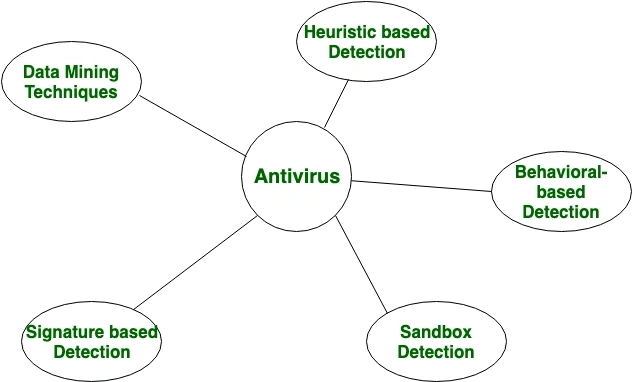
Antivirus is a security software designed to identify, prevent, and remove malware such as viruses, worms, Trojans, spyware, and ransomware. It continuously scans files, programs, and system activity to prevent data damage, personal-information theft, and performance disruption, creating a safe user environment.
What is a firewall?
A firewall is a network security system that controls traffic between a trusted network and untrusted networks like the Internet. It filters and blocks unauthorized access based on predefined security rules while permitting secure communications. In short, a firewall acts as a gate at your network border to prevent intruders.
Types of firewalls
Firewalls are categorized by location and architecture into two main types:
Software firewall
Installed as a program on the operating system and protects the same device.
- Function: Monitors and controls traffic of running applications on the device.
- Advantages: Easy to install and configure; suitable for personal computers and laptops.
- Limitations: Uses local system resources; if the OS is compromised, the firewall may fail.
Hardware firewall
A standalone physical device placed in the network path. Configuration and management are typically more complex and costly, but it provides higher network-wide security.
To assess stability, security, and maintenance of this infrastructure, refer to network support guidance.
Difference between antivirus and firewall
Think of your computer as a house. A firewall is the gatekeeper at the entrance that blocks unauthorized access and also controls outbound data. An antivirus is the inside inspector that checks for dangerous tools if something slips through. If the firewall is inactive, the antivirus may detect a threat only after intrusion; if the antivirus is inactive, the firewall can block entry but not necessarily sanitize already-internal files. Together, they provide stronger security.
Table: a complete comparison is shown below.
| Feature | Firewall | Antivirus |
|---|---|---|
| Primary concept | Defensive barrier between trusted and untrusted networks | Tool for monitoring, detecting, and removing malware |
| Main goal | Control of traffic (what comes in and goes out) | Content control (are files safe?) |
| Scope | Network layer | OS and file layer |
| Detection method | Based on IPs, ports, and network rules | Based on malware signatures and behavior analysis |
| Action type | Block access and filter data packets | Quarantine or remove infected files |
| Protection time | Instantly during data transfer | When scanning files or running programs |
| Hardware/software | Available as hardware and software | Usually software-installed |
| Intelligence | Rule-based | Signature-based with behavior learning |
| Hack prevention | Prevents intrusion by blocking malicious ports/IPs | Neutralizes threats to prevent attacker control |
| Common examples | Various firewall devices and software | Popular antivirus products |
Which threats does antivirus identify?
Antiviruses are designed to counter a wide range of digital threats collectively known as malware. The main threats typically identified and neutralized include:
- Viruses
- Trojans
- Ransomware
- Spyware
- Worms
- Adware
- Rootkits
- Keyloggers
- Phishing protection
How does a firewall protect your system?
A firewall acts as a smart filter between your internal network and the Internet, protecting based on precise traffic control. Here are the main protection steps:
Packet filtering
All traffic between your system and the Internet is in packets. The firewall checks each packet against security criteria:
- If safe: allow it.
- If suspicious: block or drop it.
IP filtering
The firewall examines source and destination IP addresses. If trying to reach blacklisted sites or servers, the connection is cut immediately.
Port blocking
Your system uses ports to communicate with the Internet. The firewall closes unused/open ports and only leaves open those required by you or trusted apps.
Outbound traffic control
A key role is preventing unauthorized data exfiltration. If malware hides on your system and attempts to send data out, the firewall blocks such suspicious outbound connections.
NAT (Network Address Translation)
Hardware firewalls use NAT to hide the real internal IP addresses from the outside world, so attackers see only the firewall rather than individual devices.
With strict rules, the firewall analyzes traffic and blocks any data packets that do not comply, protecting against unauthorized access, intrusion scans, and covert data leakage.
Should antivirus be used over firewall?
In reality, neither is superior to the other because their roles are different. If you must choose only one, your security will be incomplete. Consider the scenarios described below.
If you have no firewall: your system is like a house with doors facing the street; anyone on the Internet could access your computer ports, and a vulnerability could be exploited easily. Even if the antivirus detects a threat, damage may already be done.
If you have no antivirus: your house doors are locked, but if an infected file is brought in (for example via a USB drive), there is no one to inspect it and detect dangerous tools inside.
Conclusion
Digital security relies on a combination of antivirus and firewall. These tools are not adversaries but complementary layers. A firewall acts as a smart gate at the network border to control inbound and outbound traffic, while antivirus inspects internal files to identify and remove malware that may have bypassed defenses. Modern systems typically provide both features by default to keep devices secure against network threats and file-based infections.
Frequently Asked Questions
Does Windows include a firewall by default?
Yes. Windows, from version 7 to 11, includes Windows Defender Firewall. It is a robust firewall and suffices for most home and small office users. Windows Defender antivirus is also provided, delivering competitive protection in modern Windows versions. So, from the moment you install Windows, you have two security layers.
Do I need to install both?
Yes, it is advisable to have both types of protection. You do not necessarily need two separate programs; if you are using Windows, the built-in options cover both. If you opt for third-party software, choose a package that includes both antivirus protection and a dedicated firewall.
What is a hardware firewall?
A hardware firewall is a standalone physical device (or a feature in your modem) that sits in the Internet entry path to your network. Its main job is to inspect traffic before it reaches your devices. Many home modems include a built-in hardware firewall that automatically analyzes incoming traffic, and its major advantage is reducing the load on your computer's CPU by protecting all connected devices in one integrated way.
برای ارزیابی پایداری، امنیت و نگهداری این زیرساخت، راهنمای پشتیبانی شبکه را نیز مطالعه کنید.