Common mistakes in network cabling and how to prevent them
Poor network cabling is a frequent cause of disruptions in organizational infrastructure. This article identifies common cabling mistakes and provides practical prevention steps to ensure a reliable, scalable network.
خلاصه تخصصی مقاله
Poor network cabling is a frequent cause of disruptions in organizational infrastructure. This article identifies common cabling mistakes and provides practical prevention steps to ensure a reliable, scalable network.
موضوعات اصلی: network، cable، cabling، cables، can، meters
Mistakes in network cabling are among the most common causes of disruptions in organizational communications infrastructure. Many of the problems related to speed, stability, and quality originate from improper cabling or failure to adhere to required standards during deployment. Choosing the wrong cable type, improper routing, or incorrect equipment installation can over time reduce network efficiency and increase maintenance costs.
Given the importance of the physical network infrastructure, following cabling standards in design and execution plays a key role in the proper functioning of the entire system. Proper cabling not only creates a stable and high-speed connection but also enables easier network expansion and management in the future. Therefore, understanding common cabling mistakes can help organizations prevent potential issues and build a reliable and efficient infrastructure.
Most common network cabling mistakes
Common network cabling mistakes can have a direct impact on network performance, speed, and reliability. Often, organizational network issues arise from not following cabling principles and standards. Knowing these errors helps IT managers and network installers prevent disruptions and build a stable, dependable infrastructure.
Choosing an inappropriate cable
One of the most important mistakes in cabling is selecting a cable type without considering the actual network needs. Using cables that do not meet the required standard can reduce data transfer speed and limit network performance. Cable selection should be based on traffic volumes, distances, and future network development plans.
Incorrect cable installations
The way cables are installed plays a crucial role in network performance. Excessive bends, pulling, or routing cables through inappropriate paths can degrade signal quality and cause data transfer errors. Following installation standards during cabling is essential.
Incorrect terminations or connections
Poor termination or improper connections to network equipment can lead to frequent outages or reduced network speed. If punching down or connecting cables is not done correctly, the network will experience faults.
Typical installation errors include using cable lengths beyond the standard (over 100 meters), incorrect RJ45 terminations, and not following the T568A or T568B color-coding standards, bending or pulling cables excessively, routing near power cables which introduces noise, using low-quality cables or equipment, and failing to test cables after installation. These issues can reduce network speed, cause connectivity breaks, or increase data transmission errors.
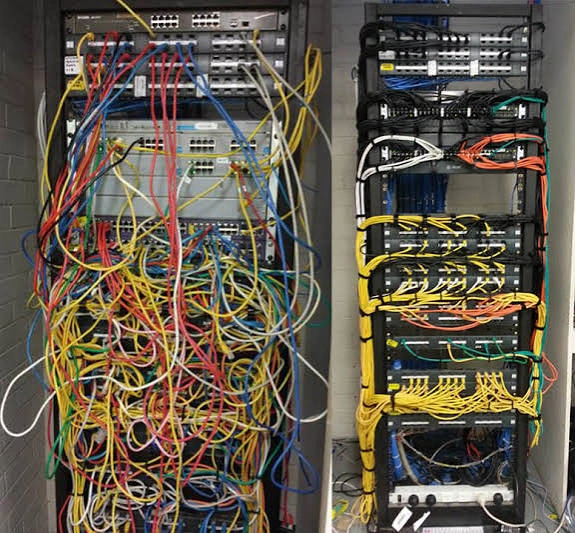
Disorganized cabling
Unorganized cabling without proper management makes maintenance and fault finding harder. When cables are not labeled or grouped in racks or cable paths, identifying and changing them becomes time-consuming.
A network cable tester is a device used to verify the correctness of cable installation and operation. It checks whether the wires inside a cable are correctly punched and detects issues such as open circuits, conductor pair misarrangements, shorts, or EMI. By using a tester, you can verify wire maps, continuity, approximate length, and signal quality to ensure proper network performance.
Running cable close to power lines
Placing network cables near power cables can introduce electromagnetic interference and degrade data transmission. Maintaining the standard distance between network and power cables helps preserve connection quality.
Ignoring standard cable lengths
Network cables have a specified maximum length; exceeding it can cause signal loss. In Ethernet networks, the standard length is generally up to 100 meters (including a fixed 90 meters of cable plus 10 meters of patch cables).
Not following cabling standards
The cabling standard comprises rules for designing and installing correct network cabling in buildings, with the most important being TIA/EIA-568. The standard defines the structure of cabling as equipment room, distribution rack, vertical (backbone) cabling, horizontal cabling, and the user area. For copper cables such as Cat5e and Cat6, the maximum link length is considered 100 meters (90 meters fixed cable and 10 meters patch cord). There are two RJ45 punching color-coding standards, T568A and T568B, with T568B being more common; both ends should follow the same standard to ensure proper network connectivity.
Table: Cable length and supported speeds
| Cable type | Max cable length | Max supported speed |
|---|---|---|
| Cat5e | 100 meters | 1 Gbps |
| Cat6 | 100 meters (up to 1 Gbps) / 55 meters for 10 Gbps | Up to 10 Gbps |
| Cat6a | 100 meters | 10 Gbps |
| Cat7 | 100 meters | 10 Gbps |
| Cat8 | ≈30 meters | Up to 25–40 Gbps |
Not implementing proper network cabling
Implementation involves planning cable routes, selecting the appropriate cable (for example Cat6 or Cat6a), installing conduits or trays, keeping distance from power cables, installing patch panels and keystones, punching down RJ45 jacks per the standards, labeling, and performing comprehensive cable testing.
Not testing after installation
One of the major mistakes is skipping the final test after completion. Without targeted testing, some hidden issues may remain and cause network problems later.
A network cable tester is a device used to verify installation correctness and identify issues such as open circuits, misplaced pairs, shorts, or noise. Using a tester can verify wire maps, cable continuity, approximate length, and signal quality to ensure proper network performance.
Lack of cabling equipment
Lack of appropriate tools for cabling, such as punch-down tools, testers, crimping tools, patch panels, and racks, can lead to incorrect cable installations, connectivity issues, reduced network performance, and difficult fault finding. Adequate equipment is essential to meet cabling standards and ensure network quality and reliability.
Not considering future network needs
If cabling is planned only for current needs, future expansion may require extensive changes or a full rebuild. A principled design should accommodate future network growth.
How to prevent cable cabling mistakes?
To prevent cabling mistakes, follow key principles: design cable routes before starting, select cables and equipment that meet standards, ensure RJ45 terminations follow either T568A or T568B, keep cables away from power lines to avoid EMI, avoid sharp bends or tension, and finally test all cables with a network tester to confirm connectivity, wire order, and overall network performance.
Summary
Adherence to cable standards and proper cabling practices are crucial for a reliable and stable network. Common issues stem from improper terminations, poor-quality cables, running cables near power lines, exceeding standard length, and skipping post-installation testing. Using suitable equipment, following cabling standards, and verifying cables with a tester help prevent these problems and result in a fast, secure, and dependable network.
Frequently Asked Questions
What is the most common mistake in network cabling?
Incorrect RJ45 terminations and not following the T568A or T568B color-coding standard can lead to connection failures or reduced speeds.
Does running network cable near power lines cause problems?
Yes. Proximity to power cables can introduce EMI and disrupt data transmission; maintain the recommended distance between network and power cables.
What is the maximum length of a network cable?
For copper cables such as Cat5e and Cat6, the standard maximum length is about 100 meters (roughly 90 meters of fixed cable plus 10 meters of patch cord).
Is a network tester essential?
Yes. Using a tester to verify connectivity, wire order, and potential faults is important to ensure correct network operation.
For assessing reliability, security, and maintenance of this infrastructure, also consult the network support guide.
برای ارزیابی پایداری، امنیت و نگهداری این زیرساخت، راهنمای پشتیبانی شبکه را نیز مطالعه کنید.