DHCP Relay Configuration for IP Allocation in Cisco Networks
DHCP Relay enables centralized IP addressing across multiple subnets in Cisco networks. By forwarding DHCP broadcast requests as unicast to a central server, it reduces server proliferation and simplifies network configuration and monitoring.
خلاصه تخصصی مقاله
DHCP Relay enables centralized IP addressing across multiple subnets in Cisco networks. By forwarding DHCP broadcast requests as unicast to a central server, it reduces server proliferation and simplifies network configuration and monitoring.
موضوعات اصلی: پشتیبانی شبکه، فایروال، DHCP، سرور، Relay، استفاده
Setting up DHCP Relay for IP allocation in Cisco networks is a smart approach to centralized address management in multi-subnet environments. Since routers do not forward broadcast traffic by default, clients cannot directly reach the central server. Enabling this service allows the router to receive local requests and forward them unicast to the DHCP server. This approach reduces the need to maintain multiple servers and simplifies network configuration and monitoring.
What is DHCP Relay?
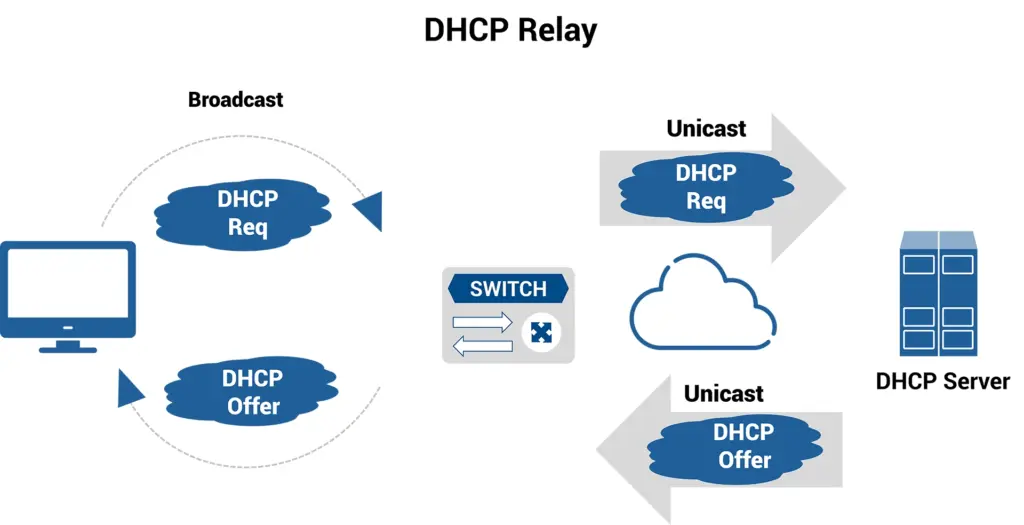
In large organizational networks divided into multiple subnets, DHCP can face challenges because DHCP requests rely on broadcast. Routers do not forward such traffic, preventing clients on other subnets from reaching the central DHCP server.
To overcome this limitation, a DHCP Relay Agent is used. This service, typically active on Layer 3 routers or managed switches, receives client broadcast requests, converts them to unicast messages, and sends them directly to the DHCP server in the target subnet.
Key advantages:
- Centralized management: use a single server to manage addressing across the organization.
- Cost reduction: remove the need to install and maintain multiple DHCP servers.
- Improved efficiency: easier policy enforcement and dynamic IP management (IPAM) at scale.
This approach is considered the standard solution for scalable modern networks.
Note that this method forwards client requests to the central server for centralized and efficient IP addressing.
How DHCP Relay Works
DHCP Relay works by converting broadcast requests to unicast so they can pass through routers. When a client on a subnet initiates, it sends a DHCP Discover with a broadcast destination. Relays capture this and forward to the server with the appropriate Giaddr field, indicating the origin subnet.
Giaddr is populated by the Relay with the IP address of the interface that received the request, enabling the central server to allocate an IP from the correct pool.
Central advantages include reliable addressing without prior knowledge of every subnet and streamlined IP management.
Advantages of DHCP Relay
Centralized management, reduced hardware costs, improved scalability, and easier policy enforcement across subnets.
Economically, removing multiple servers across branches reduces hardware, power, and maintenance costs. The architecture also improves resilience since a central server can be replaced if needed, whereas distributed local servers could cause client outages when down.
Configuration of DHCP Relay on Cisco Routers
To configure DHCP Relay on Cisco devices, use the ip helper-address command on the interface connected to clients. This directs the router to receive DHCP broadcast requests and forward them unicast to the central DHCP server.
Typical steps:
- interface GigabitEthernet0/1
- ip helper-address 192.168.1.100
- end
Note that, by default, this command forwards other UDP services as well. If you want to restrict to DHCP only, you can disable other protocols with no ip forward-protocol udp, though in typical enterprise environments the default is usually preferred. After applying changes, verify with show running-config.
Important Configuration Notes
- Routing must be two-way; the Relay router must be able to reach the DHCP server, and the server must be able to respond to the client subnets.
- Giaddr must be properly populated; otherwise the server may allocate from the wrong scope.
- Limit forwarded traffic: ip helper-address forwards multiple UDP services by default. In larger or sensitive networks, enable only necessary ports and ensure internal firewalls do not block DHCP traffic.
Summary
DHCP Relay on Cisco is configured with ip helper-address on the client interface, converting broadcast requests to unicast and sending them to the central server. Defining appropriate scopes on the server for each subnet and ensuring two-way routing are essential. This centralized management approach reduces costs and improves network scalability.
Frequently Asked Questions
Can multiple DHCP servers be defined for Relay?
Yes. By specifying ip helper-address multiple times on the same interface, requests are forwarded to each listed server. This is commonly used to implement failover configurations so that other servers respond if the primary server fails.
If DHCP Relay does not work, what should be done?
First check two-way routing between the router and the DHCP server and ensure that no network devices block UDP ports 67 and 68. Use debugging commands like debug ip dhcp server packet and review server logs to confirm requests are being sent and received. Also verify that the server scopes align with the client subnets.
Is ip helper-address used on all routers?
No, ip helper-address is specific to Cisco IOS. Other brands use different commands for similar functionality. The underlying principle remains converting broadcast requests to unicast and directing them to the central server.
برای ارزیابی پایداری، امنیت و نگهداری این زیرساخت، راهنمای پشتیبانی شبکه را نیز مطالعه کنید.