How to enable Remote Desktop access via MikroTik router
Remote Desktop access through MikroTik is a common method to reach internal systems from the Internet. This guide explains step by step how to enable and configure Remote Desktop using NAT/Port Forwarding on MikroTik, including security considerations and alternatives such as VPN.
خلاصه تخصصی مقاله
Remote Desktop access through MikroTik is a common method to reach internal systems from the Internet. This guide explains step by step how to enable and configure Remote Desktop using NAT/Port Forwarding on MikroTik, including security considerations and alternatives such as VPN.
موضوعات اصلی: MikroTik، internal، Desktop، through، Remote، access
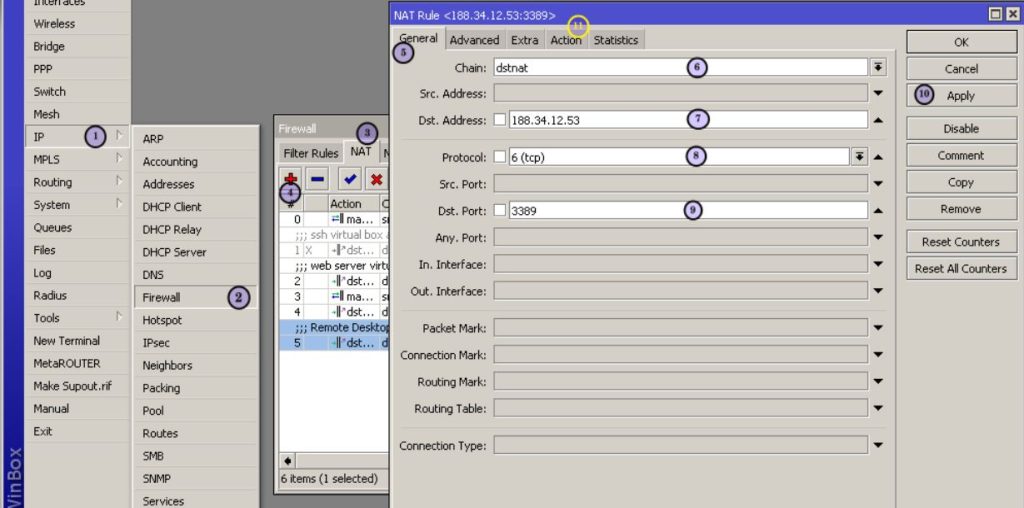
Remote Desktop access through MikroTik is a common approach to reach internal systems over the Internet. MikroTik routers provide capabilities to forward external requests to a specific internal device using NAT or dst-nat. This guide explains step by step how to enable and configure Remote Desktop access through MikroTik, and discusses security considerations to reduce exposure and alternatives like VPN.
برای ارزیابی پایداری، امنیت و نگهداری این زیرساخت، راهنمای پشتیبانی شبکه را نیز مطالعه کنید.