How to test and troubleshoot network cabling
Testing network cabling is a foundational step in setting up and maintaining computer networks. This guide covers essential tools and methods to assess cable health, identify faults, and resolve common issues.
خلاصه تخصصی مقاله
Testing network cabling is a foundational step in setting up and maintaining computer networks. This guide covers essential tools and methods to assess cable health, identify faults, and resolve common issues.
موضوعات اصلی: cable، tester، can، cables، wire، reference
Tools required for network cable testing
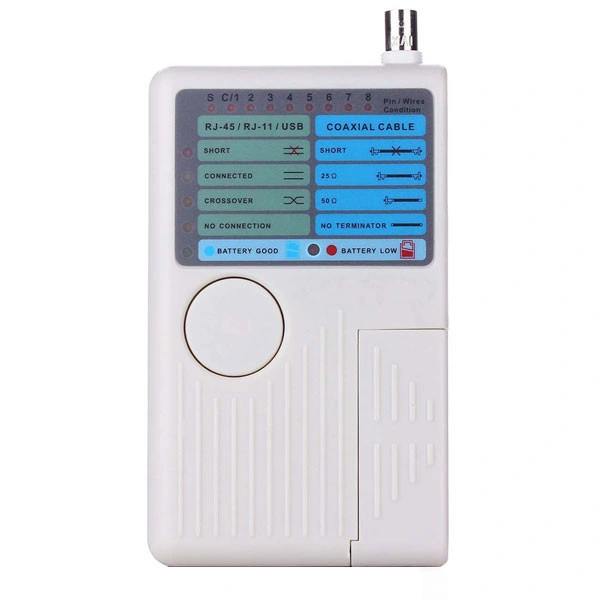
Network cable tester
This device checks the correct wiring order and whether the cable is terminated to standard. It can detect open circuits, shorts, and wire misplacements, and some models estimate cable length and locate faults.RJ45 crimp tool
This tool is used to install RJ45 connectors on cables and ensures proper wire placement and full contact with connector contacts.Good quality reference cable
A healthy reference cable is useful to verify tester accuracy and to compare test results.Punch-down tool
Used to terminate cables in keystones or patch panels with correct wire seating.Multimeter
A multimeter measures electrical quantities and can help check continuity and detect open circuits in specific scenarios. It is not a replacement for a network tester but can assist in initial diagnosis.Tone generator and probe
To trace cable paths among many cables, a tone generator sends a signal and the probe detects the path or other end.Advanced tester or Fluke
Professional testers assess structured cabling with parameters such as signal loss, noise, interference, distance, and standard compliance.Cable loop tester
A loop tester placed at the end of a cable helps verify complete path testing and speeds up the process.Flashlight and visual tools
Low-tech checks like bending, insulation wear, or crushed jackets can be performed visually.Cable labeling check
Labeling aids in identifying source and destination, speeding up troubleshooting.برای ارزیابی پایداری، امنیت و نگهداری این زیرساخت، راهنمای پشتیبانی شبکه را نیز مطالعه کنید.