Equipment Required for Network Cabling: A Comprehensive Guide
Network cabling involves installing cables, connectors, and peripherals to enable reliable, fast, and secure communications within a network. This guide covers essential cabling equipment and considerations for selecting them.
خلاصه تخصصی مقاله
Network cabling involves installing cables, connectors, and peripherals to enable reliable, fast, and secure communications within a network. This guide covers essential cabling equipment and considerations for selecting them.
موضوعات اصلی: پشتیبانی شبکه، شبکه، کابل، تجهیزات، استفاده، میشود
Network cabling is the process of establishing communication between devices in a network by installing cables, connectors, and peripheral equipment that provide reliable, fast, and secure connections. Adhering to standards and selecting the right equipment helps extend network life and reduce noise and failures. This work requires experience and precision to ensure long‑term performance.
Why understanding cabling equipment matters
Understanding cabling equipment is a key step in designing and implementing a robust network infrastructure. Each tool, even small, plays a specific role in ensuring proper and efficient connectivity. Without knowledge, there is a higher risk of errors, reduced data speeds, and safety hazards. Incorrect equipment choice can also raise maintenance costs.
Complete list of network cabling equipment
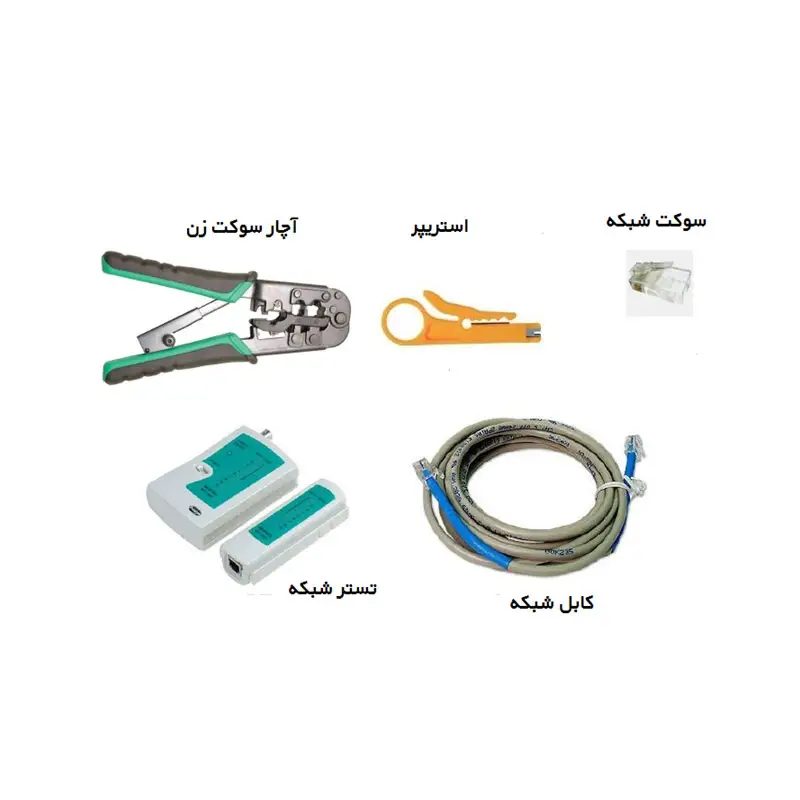
Network cable
Network cables are the backbone of any network. They come in varieties such as CAT5e, CAT6, CAT6a, and CAT7, each with different data rates and noise resistance. In modern projects, CAT6 or higher is often used to guarantee high bandwidth and fast data transfer. The right cable choice depends on factors such as length, ambient noise, and the desired network speed.
Network socket
The RJ45 connector is among the key joining components of network cabling. It attaches to the ends of the network cable to provide a physical connection to devices like switches, routers, or wall outlets. Correct installation and high-quality materials reduce signal loss and increase durability. Shielded connectors are recommended in noisy environments.
Network tester
A network tester is essential to verify correct cable performance. After wiring, it sends signals to check connectivity, cable length, and proper termination. Without a tester, hidden faults may remain and cause issues later. Advanced testers can measure bandwidth or pinpoint the fault location. Therefore, final testing with a network tester is essential.
Punch down tool
A punch down tool is an important tool for connecting cables to patch panels, keystones, and outlets. It seats wires with precise pressure and trims excess. A quality punch down tool yields stronger, longer-lasting connections.
Rack
A rack provides a structured space to house active equipment such as servers, switches, patch panels, and routers. Racks can be wall-mounted or floor-standing and are chosen according to capacity. Racks increase equipment security, organization of cabling, and cooling efficiency.
Patch panel and keystone
The patch panel serves as the central point for connecting horizontal cables, with keystone jacks mounted in it. Keystones RJ45 are where the cables are punched. This arrangement helps keep the rack organized, simplifies replacements, and reduces signal interference. Installing a patch panel and keystone is a fundamental requirement in professional cabling.
Duct and trunking
To manage cable paths and protect cables from damage, ducts and trunking are common. Ducts are used for internal routes with a limited number of cables, while trunking accommodates larger routes and space for outlets. They contribute to safety, heat management, and interference reduction.
Keystone
Keystone or modular network receptacles install in patch panels, outlets, or trunking, and cables are punched into them. Keystones come in various types such as UTP, STP, and Cat5e to Cat8 and must match the cable type. Keystones help manage and organize networks and are easily replaceable.
Outlet
A network outlet is the physical connection point for users. Typically mounted on walls, an internal keystone sits in it and the cable is punched from behind. Through the outlet, the patch cord connects to devices.
Media converter
Media converters are used when converting media between copper and fiber. They enable connectivity between copper and fiber segments without loss of quality.
Surge protector
To protect network equipment from power surges or lightning, a surge protector is essential. It helps prevent damage and extends the life of expensive equipment.
Fiber optic
Fiber optic cables transmit data using light, offering high bandwidth and very low latency, suitable for long distances or high-volume links. They are less susceptible to electromagnetic interference. In professional networks and data centers, fiber is recommended for backbone connections.
Connector
Connectors join cables and devices. In copper networks, RJ45 is most common, while in fiber networks connectors such as SC, LC, or ST are used. Connector quality strongly influences network stability and speed. Poor connections can cause signal loss or outages.
Access point
Access points provide wireless access by expanding Wi‑Fi coverage. Some models support centralized management, which is highly suitable for large wireless networks.
Key points in selecting cabling equipment
When selecting network cabling equipment, consider key factors: physical conditions of the installation site, environmental noise, humidity, and cable-run length. Brand and quality matter; using equipment with warranty can reduce maintenance costs. Compliance with global standards such as TIA/EIA and ISO/IEC is essential for long‑term network performance. Finally, consult with specialists to obtain equipment that fits project needs for a stable, secure, and scalable network.
For guidance on network support, see the network support guide.
برای ارزیابی پایداری، امنیت و نگهداری این زیرساخت، راهنمای پشتیبانی شبکه را نیز مطالعه کنید.