What is a Local Area Network (LAN)? How it works and its applications
A Local Area Network (LAN) connects devices within a limited geographic area to share resources such as Internet access, printers, and files. This article explains what a LAN is, its typical topologies, VLANs, WAN differences, and deployment considerations.
خلاصه تخصصی مقاله
A Local Area Network (LAN) connects devices within a limited geographic area to share resources such as Internet access, printers, and files. This article explains what a LAN is, its typical topologies, VLANs, WAN differences, and deployment considerations.
موضوعات اصلی: راهاندازی شبکه، LAN، devices، connect، can، access
What is a Local Area Network (LAN)?
A Local Area Network (LAN) is a small and local communication system that connects computers, laptops, smartphones, printers, and other devices within a defined area such as a building or office to share resources such as Internet access, printers, files, and shared applications.
In these networks, devices connect to share resources efficiently. For example, employees in an office can print to a shared printer or access shared files.
Advantages and limitations of LANs
LANs offer many benefits such as ease of sharing resources, centralized management, and the ability to enforce security policies. However, as the number of devices and users grows, speed and efficiency may decline, and ongoing maintenance by IT staff becomes necessary. Security considerations depend on proper configuration and the use of appropriate architectures such as client-server and peer-to-peer.
What is the main feature of a LAN?
The main feature is that it connects devices within a limited geographical area. By contrast, WANs or MANs cover larger areas or connect multiple LANs.
What is a VLAN?
Virtual Local Area Networks or VLANs divide traffic on the same physical network into separate logical networks. For example, a single physical LAN can be divided into administrative and finance segments without extra hardware. This division is achieved via software settings so that each segment has access to its own resources. Sometimes two separate LANs exist with their own routers and Internet connections; VLANs can enable traffic separation over a single router and Internet connection.
VLAN management differs from LAN management in that VLANs help control traffic and access in large LANs. VLANs are not the same as subnets; subnets are a method to divide a network to improve efficiency and are commonly used alongside VLANs.
How do LAN and WAN differ?
LANs are used in smaller areas like homes or offices and connect devices within that local space. WANs cover broader geographical scopes such as cities or countries and typically rely on the Internet or private lines to connect networks.
How does a LAN operate?
In a LAN, all devices connect via a central device such as a switch or router to communicate. This connection can be wired or wireless:
Wired: devices connect via Ethernet cables to a switch.
Wireless: communication is through Wi-Fi, requiring no cabling.
To set up a LAN, each computer needs a network interface card that enables communication with other devices. NICs can be integrated or external via USB.
When transferring a file from one computer to another, data pass through the switch or router to reach the destination, enabling fast and direct connectivity.
Types of LANs and their distinctions
LANs can be categorized by device types, infrastructure design, and deployment environment. Modern LANs also include cloud-native LAN concepts that rely on cloud platforms for management and policy enforcement.
Client-server LAN: In this model, a central server provides services to multiple client devices. Clients do not directly communicate with each other; a central system manages traffic, access control, and resources. This model works well in small to medium environments, but it may put pressure on the central server in larger setups.
Peer-to-Peer LAN (P2P): Devices connect directly to each other and share data. This model is flexible but lacks centralized management and does not scale as well as client-server.
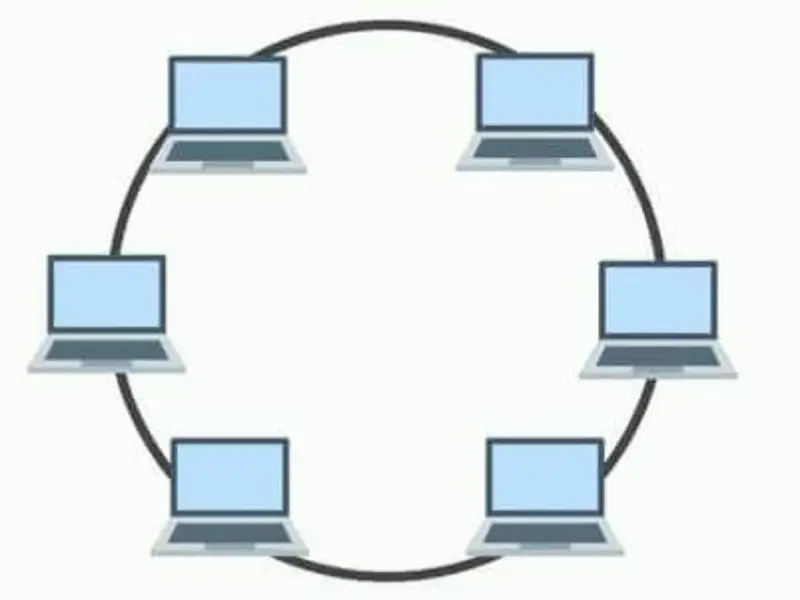
Token Ring LAN (Token Ring): Devices form a ring and a token grants permission to send data. This technology has historical significance and is less common today.
Token Bus LAN (Token Bus): Devices connect in a tree-like topology and tokens pass sequentially. This topology can offer higher bandwidth than Token Ring.
Wired LAN: Data is transmitted over cables such as fiber or copper and is typically reliable and fast when the central server operates properly.
Wireless LAN: Wireless LANs are widely used in homes and offices to connect computers and smart devices; security must be carefully configured.
Cloud-managed LAN: Managed LANs that use cloud platforms for provisioning, policy enforcement, and security management; well-suited for organizational use.
Topology of Local Area Network
Topology describes how devices are arranged and connected. The three main topologies are:
Star topology: All devices connect to a central device (switch or hub). This is often best for small networks since a single failure does not bring down the entire network.
Ring topology: Devices form a ring and data travels from one device to another until it reaches the destination. This is less common today because a failure can interrupt the whole connection.
Bus topology: All devices connect via a shared bus. Simple and low-cost, but a fault in the bus can disrupt the entire network.
Key LAN applications
LANs play a crucial role in modern environments and are used in homes and business settings. Some key applications include:
Connecting devices: computers, printers, cameras, smart devices, and other equipment are linked to share files, access the Internet, print remotely, and exchange data.
Resource sharing: printers, servers, and storage devices are shared to reduce costs and increase efficiency.
Fast and reliable communications: high-quality, stable connectivity supports daily data transfers and tasks.
Centralized management: data and services can be controlled from a central server in client-server configurations.
Support for smart devices: IoT growth enables connecting various devices to a local network for management.
Remote access: users can access data and resources from different locations.
Cost reduction: central resources reduce the need for separate storage and processing units for every device.
Security and access control: precise access controls and security policies help protect data.
These applications make LANs valuable in homes, offices, educational and clinical settings, facilitating efficiency, reducing costs, and enabling smoother communication.
راهاندازی شبکه داخلی چگونه انجام میشود؟
برای پیادهسازی یک LAN، ابتدا تمام دستگاهها باید به یک سوئیچ یا روتر وصل شوند. سپس آدرسهای IP و تنظیمات امنیتی پیکربندی میشود. با این مراحل، میتوانید از منابع شبکه استفاده کنید.
جمعبندی
شبکه محلی یا LAN مجموعهای از دستگاهها است که در یک محدوده جغرافیایی محدود به هم متصل میشوند تا منابعی مانند اینترنت، فایلها و چاپگرها به اشتراک گذاشته شوند. LANها برای اشتراک منابع، ارتباط سریع و مدیریت متمرکز مناسب هستند و در خانهها، دفاتر، مدارس و محیطهای صنعتی کاربرد گسترده دارند. این شبکهها از فناوریهایی مانند اترنت و WiFi استفاده میکنند و به دلیل کاهش هزینه، افزایش امنیت و سهولت ارتباطات، به ابزار حیاتی برای سازمانها تبدیل شدهاند.
برای ارزیابی پایداری، امنیت و نگهداری این زیرساخت میتوانید به منابع پشتیبانی مربوطه مراجعه کنید.
سوالات متداول
تفاوت LAN و WAN چیست؟
تفاوت اصلی بین LAN و WAN در ابعاد جغرافیایی است. LAN برای محیطهای کوچک مانند خانه و دفتر مناسب است و دستگاهها را در یک فضای محدود به هم متصل میکند. WAN شبکهای گستردهتر است که مناطق بزرگ یا جهان را پوشش میدهد و معمولاً از اینترنت یا خطوط ارتباطی اختصاصی برای اتصال استفاده میکند.
چه اجزایی برای راهاندازی یک LAN لازم است؟
برای راهاندازی LAN، به چند جزء اصلی نیاز است: سوئیچ یا روتر برای اتصال دستگاهها، کابلهای Ethernet برای شبکه کابلی یا تجهیزات بیسیم برای شبکه وایرلس، کارتهای شبکه برای هر دستگاه و تجهیزات بیسیم مانند مودم و اکسس پوینت. انتخاب این تجهیزات بستگی به نوع و کاربرد شبکه دارد.
آیا راهاندازی LAN گران است؟
هزینه راهاندازی LAN به مقیاس و سطح پیچیدگی آن بستگی دارد. در محیطهای خانگی و دفاتر کوچک معمولاً هزینه کمتری دارد و با استفاده از تجهیزات استاندارد قابل دستیابی است. در صورت استفاده از تجهیزات با کیفیتتر یا نیاز به خدمات تخصصی، هزینه ممکن است افزایش یابد.
برای ارزیابی پایداری، امنیت و نگهداری این زیرساخت، راهنمای پشتیبانی شبکه را نیز مطالعه کنید.