Patch Panels in Modern Networks: Types, Structure, and Applications
This article explains patch panels, their structures, and practical applications in modern networks, highlighting how they simplify cabling and maintenance.
خلاصه تخصصی مقاله
This article explains patch panels, their structures, and practical applications in modern networks, highlighting how they simplify cabling and maintenance.
موضوعات اصلی: Patch، Panel، Panels، network، cables، cable
What is a Patch Panel?
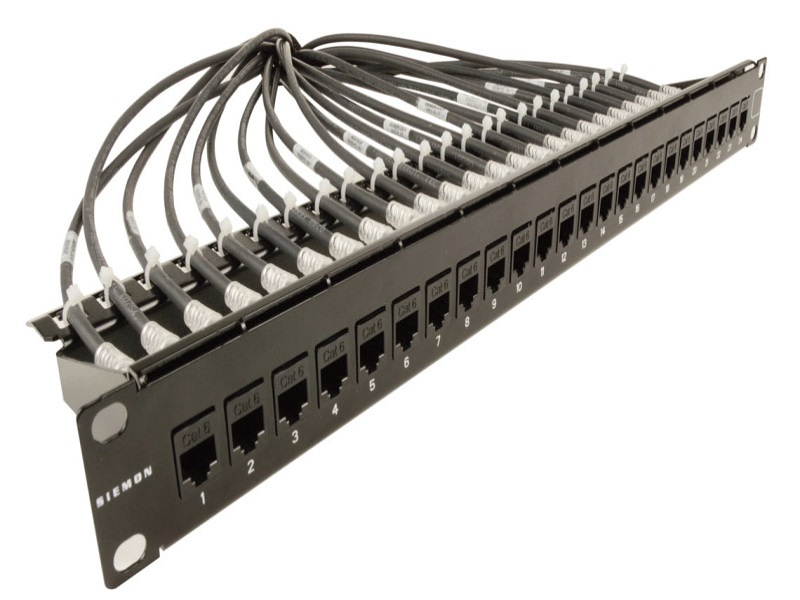
A patch panel is a compact rectangular device that aggregates a fixed number of Ethernet ports and is mounted in a rack or equipment closet. It serves as a central point to connect cables from workstations to network devices and helps organize and manage the cabling. Using a patch panel simplifies scaling and maintenance of the network.
Nature of Patch Panels
In a network, wall outlets and cables are wired to a central location. A patch panel acts as the central point where incoming cables from outlets are terminated and connected to switch or hub ports, enabling easier management and fault isolation. Each port on the patch panel corresponds to a terminated cable and is labeled for easy traceability.
Types of Patch Panels by Structure
- Modular Patch Panel: Allows mixing ports of different types such as UTP SFTP STP and various Cat6 Cat7 groups; fiber ports for single and multi-mode are available. A key advantage is that if a port fails, only that keystone can be replaced without replacing the entire panel.
- Non Modular Patch Panel: Fixed-port solutions with limited flexibility; you cannot mix arbitrary ports.
Applications of Patch Panels
When a new user is added to the network, cables from outlets are gathered at the central rack and connected into the patch panel, then numbered so any outlet can be connected to a switch with a single patch cord when needed. The number of panels depends on the size of the network, but the main point is that all cables terminate at the patch panel and form the network connections.
Benefits of Using Patch Panels
- Direct visibility and access to all cables in the server room without moving around other areas.
- Simplified process of adding users and maintaining the cabling structure.
- Network expansion with minimal changes to infrastructure and reduced cost.
- Ease of moving servers between switches or relocating clients.
- Faster fault diagnosis and easier cable and port replacement.
- Directly connecting services to specific ports without re-cabling.
- Improved organization and aesthetics in the rack environment.
Comparison of CAT5, CAT6, and CAT6A Patch Panels
CAT5, CAT6 and CAT6A patch panels are used for cabling management and device connectivity. Key differences are:
- CAT5 Patch Panel
- Maximum data rate: up to 100 Mbps
- Bandwidth: 100 MHz
- Suitable for small networks with lower bandwidth needs
- Features: most economical for home or small office use
- CAT6 Patch Panel
- Maximum data rate: up to 1 Gbps (up to 55 meters)
- Bandwidth: 250 MHz
- Suitable for organizational networks requiring higher speed and bandwidth
- Features: good price-performance; preferred for many office networks
- CAT6A Patch Panel
- Maximum data rate: up to 10 Gbps (up to 100 meters)
- Bandwidth: 500 MHz
- Suitable for data centers and high-demand networks
- Features: higher cost but supports very high speeds; recommended for professional environments
Table comparing fiber optic and copper patch panels
| Type of Patch Panel | Supported Cable Type | Port Count | Main Use | Advantages | Disadvantages |
|---|---|---|---|---|---|
| Copper Modular | CAT5/CAT6/CAT7 | 12-48 | Office networks; standard networks | Easy repairs; keystone flexibility | Higher cost than non-modular |
| Copper Non-Modular | CAT5/CAT6 | 24 or 48 | Simple networks | Low cost; fixed structure | Harder repairs |
| Fiber SC | Single mode / Multi-mode | 12-72 | Data centers; fast connections | High bandwidth | Fragility |
| Fiber LC | Single mode / Multi-mode | 24-144 | High speed and stable networks | High density; space efficiency | More expensive |
Disadvantages of not using a Patch Panel
Not using a patch panel can lead to issues such as difficulty locating specific cables, the need to access the back of the rack, and greater complexity when changing connections.
- Directly wiring a specific client to a server room system may require an additional cable or locating the cable with a tester.
- Transferring a server from one switch to another may require going to the back of the rack, which is often dusty.
- Physically detaching a client cable from a switch or reordering connections can be challenging.
Key buying considerations include cable compatibility, cost, and space efficiency.
Nکات مهمی که باید در هنگام خرید به آنها توجه کرد
- Patch panels come in different dimensions and port densities; choose a panel that matches the used cabling to avoid signal degradation.
- The total length from user to switch is typically limited to 99 meters for copper Ethernet; ensure compliance with standard cabling rules.
- Patch panels are not limited to copper; there are fiber panels with various connectors such as ST SC and MT-RJ. However, for horizontal cabling copper often suffices.
- Smart patch panels with displays and monitoring capabilities exist but require power and may carry higher costs.
برای ارزیابی پایداری، امنیت و نگهداری این زیرساخت، راهنمای پشتیبانی شبکه را نیز مطالعه کنید.