Why do some CCTV cameras show dark or white (Overexposed) images at night, and how can we fix it?
This article explains why CCTV cameras may display dark, grainy, or even completely white night images and how to fix it. It covers common causes from improper installation to incorrect settings or low hardware quality, with practical remedies for both users and installers.
خلاصه تخصصی مقاله
This article explains why CCTV cameras may display dark, grainy, or even completely white night images and how to fix it. It covers common causes from improper installation to incorrect settings or low hardware quality, with practical remedies for both users and installers.
موضوعات اصلی: پشتیبانی شبکه، نور، تصویر، دوربین، سفید، نصب
Introduction
Night image quality is a crucial metric of CCTV performance. After installation, night footage may appear dark, grainy, or even completely white (overexposed). This not only hides details but can reduce security effectiveness in critical moments. Causes range from improper installation to incorrect settings or low hardware quality. This article provides practical explanations of why this happens and how to fix it, for both general users and professional installers.
Why does the night image become dark or white on CCTV cameras?
This is a common issue with several possible causes which we outline below.
IR Reflection
- When the camera is mounted behind glass or facing a reflective surface, IR light can reflect into the lens.
- Result: a completely white or hazy image.
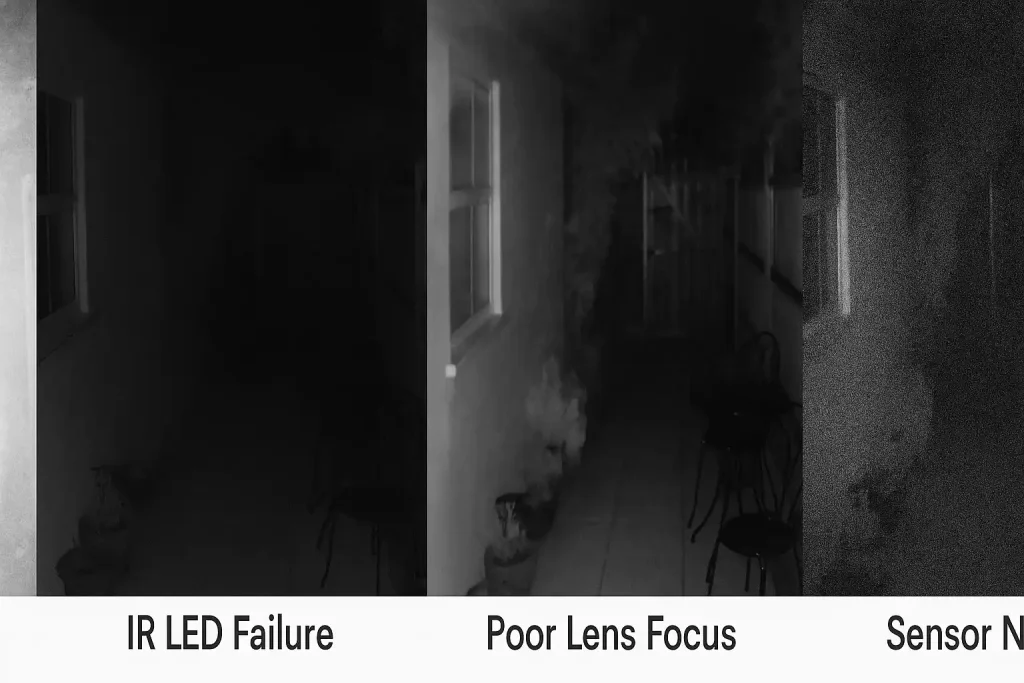
Weak or failed IR LEDs
- IR LEDs provide night illumination.
- If they are weak or faulty, the image may appear dark or low quality.
Incorrect focal length in low light
- Some lenses struggle to focus properly in dim conditions.
- This can cause a blurry or out-of-focus image.
Image sensor noise
- In low light, weak sensors generate more noise.
- This shows as white specks or a grainy image.
Incorrect Exposure or Gain settings
- Automatic gain/exposure may excessively amplify light in some cameras.
- Result: overexposed or completely white night image.
One of the most common installer mistakes is mounting the camera directly opposite a doorway with powerful lighting or a white surface, causing strong IR reflection and a white image. The best approach is to adjust the mounting angle and use a camera with Smart IR that automatically regulates illumination.
What are the fixes for dark or white night images?
If after installation you notice night images are dark or white, try these steps to resolve the issue.
Correct the mounting position
- Avoid mounting behind glass or in front of bright white walls.
- Mount the camera at a slight angle to prevent IR reflection into the lens.
Use cameras with IR Cut Filter and Smart IR
- Cameras with an IR Cut filter help manage stray light at night.
- Smart IR adjusts infrared intensity with distance to the subject to prevent overexposure.
Check and replace IR LEDs
- If IR LEDs are weak or fail, replace them or upgrade the camera.
- Choosing a reputable brand can prevent such issues in the short term.
Optimize camera settings
- In the camera menu, reduce Gain or Exposure to prevent overexposure.
- Enable features such as WDR or BLC to balance lighting.
Use ambient lighting
Providing ambient light reduces the burden on the internal LEDs. If the environment is very dark, consider a separate IR light or a soft white light.
| Night image issue | Main cause | Recommended solution |
|---|---|---|
| White hazy image | IR reflection from glass or shiny surface | Change installation position and angle |
| Dark/low-light image | Weak or failed IR LEDs | Check/replace LEDs or upgrade camera |
| Blurry/non-clear image | Incorrect lens focus at night | Manual focus adjustment or use a quality lens |
| Noisy image | Low sensor sensitivity in low light | Choose a camera with a better sensor or add auxiliary lighting |
| Overexposed image | Incorrect Gain/Exposure settings | Reduce Gain and enable WDR/BLC |
Conclusion
Night visibility quality is a key consideration in selecting and installing CCTV. Issues such as darkness, overexposure, or heavy noise can degrade the value of recorded footage and compromise security during critical moments.
Most of these problems arise from IR reflection, IR LED failure, improper focus, or incorrect settings. Fortunately, through steps like adjusting placement, using cameras with IR Cut and Smart IR, replacing worn components, and correctly tuning camera parameters, these issues can be fully resolved.
Ultimately, for best results from your surveillance system, use high-quality equipment and consider entrusting installation and settings to professional teams. This will ensure clear night imagery and maintain security at the highest level.
Why does the night image become white and hazy when the camera is behind glass?
This issue is due to infrared reflection. To fix it, install the camera outside the glass or at an angle that avoids reflection.
Why is the night image too dark?
Typically caused by weak or failed IR LEDs. In this case, replace the LEDs or upgrade to a camera with stronger infrared illumination.
Why is the night image noisy?
This is due to the camera sensor’s quality or sensitivity in low light. Use a camera with a better sensor or add auxiliary lighting (IR or soft white light) to resolve it.
How to fix overexposed/night white images?
Reduce the Gain and enable features like WDR or BLC to prevent this problem.
برای ارزیابی پایداری، امنیت و نگهداری این زیرساخت، راهنمای پشتیبانی شبکه را نیز مطالعه کنید.