Storage Management in VMware ESXi: Challenges and Datastore Optimization Strategies
In VMware ESXi, storage and Datastore play a central role. This article discusses the challenges and optimization approaches for Datastore and offers strategies to improve performance and reliability in enterprise environments.
خلاصه تخصصی مقاله
In VMware ESXi, storage and Datastore play a central role. This article discusses the challenges and optimization approaches for Datastore and offers strategies to improve performance and reliability in enterprise environments.
موضوعات اصلی: Datastore، Storage، Step، snapshots، ESXi، Capacity
Storage Management in VMware ESXi: Challenges and Datastore Optimization Strategies
In modern enterprise environments, virtualization stands as a core pillar of IT infrastructure. Datastore serves as the central storage for virtual machine files, snapshots, and critical data. Proper Datastore management is essential to maintain performance and reliability. This article outlines common challenges and practical optimization methods for Datastore in ESXi to enhance stability and efficiency of the infrastructure.
Datastore in VMware ESXi and its Key Role in VM Performance
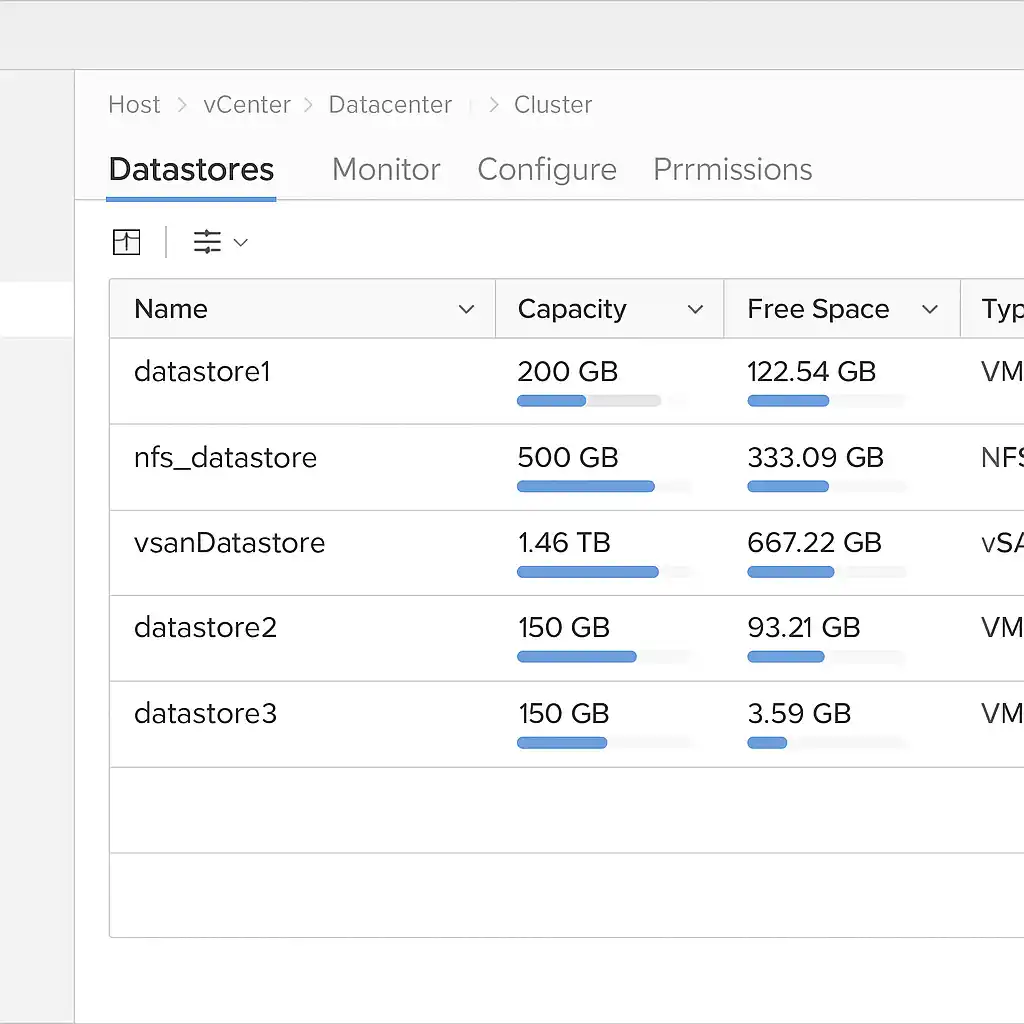
In ESXi, all data and VM files reside on a Datastore. A Datastore is a logical storage resource that can be implemented on local disks, SAN, NAS, or distributed solutions such as vSAN.
This component enables administrators to manage critical items such as VM files (VMDK), configurations, snapshots, and clones.
Choosing the Datastore type and how it is configured directly affects VM performance, data processing speed, and overall infrastructure stability. For example, VMFS is common in environments requiring high performance, while NFS offers greater scalability flexibility.
In short, the Datastore is the heart of storage operations in ESXi, and without proper management, even the best servers cannot deliver required performance.
Optimization Methods for Datastore in VMware ESXi (Step by Step)
Step 1: Establish a Baseline: Assess Capacity and Performance
- Open the vSphere client and navigate to Datastore and then Capacity/Performance.
- For each host, review Performance and Advanced under Disk.
- Consider CLI measurements on the host as well.
The typical goal is to keep DAVG/cmd under 20 ms and GAVG/cmd under 25–30 ms.
Step 2: Space Reclamation
- Identify and consolidate or remove snapshots.
- Remove unnecessary files such as ISO images, logs, and old VMs from the Datastore.
- Use UNMAP on VMFS to reclaim space.
In VMFS-6, this operation can run in the background; manual execution on busy datastores is sometimes useful.
Step 3: Set Snapshot Policy
- Limit snapshot lifetime to a maximum of 7 days.
- Limit concurrent snapshots per VM to 2.
- Configure alerts in vCenter for Snapshot Age/Size.
- Prefer using VADP-compatible backup tools rather than long-term snapshot retention.
Step 4: Scale Capacity with Minimal Downtime
- Expand the LUN on the storage array.
- Rescan on hosts (Host → Storage → Adapters → Rescan).
- Expand the Datastore to grow VMFS capacity.
If using vSAN or NFS, follow the platform-specific expansion guide.
Step 5: Optimize I/O Performance
- Enable Storage I/O Control on the Datastore and tune congestion thresholds.
- Create a Datastore Cluster with Storage DRS for automatic load balancing.
- Isolate heavy workloads on separate datastores with SSDs/NVMe.
- Enable VAAI for hardware offloads.
Set multipathing for SAN disks to Round-Robin and configure Jumbo Frames for iSCSI/NFS and Port Binding where applicable.
Step 6: Proper Disk Segmentation and Provisioning
- Use Thick Eager-Zeroed disks for large VMs on fast datastores.
- Use Thin provisioning for general use with periodic UNMAP checks.
- Convert disk provisioning with Storage vMotion as needed.
Step 7: Resilience and Availability
- Enable vSphere HA and VMCP for APD/PDL to auto-recover from LUN outages.
- Define at least two heartbeat datastores.
- Set capacity alarms at 75/85/95 percent.
Step 8: Security and Access
- Limit Datastore access via Roles and Permissions.
- Enable ESXi Shell or SSH only for authorized admins.
- Consider VM Encryption or storage-level encryption for sensitive data.
Step 9: Continuous Monitoring
- Use vCenter alarms and external tools such as PRTG or Zabbix for monitoring.
- Provide a dashboard for latency, queue length, capacity growth, and large/old snapshots.
Step 10: Regular Maintenance
- Consolidate or remove snapshots as part of maintenance.
- Run UNMAP regularly.
- Review alarms and logs; verify path health and VAAI status.
- Update SIOC/SDRS policies according to workload changes.
Table: Summary of Datastore Optimization Actions in ESXi
| Phase | Action | Short Description | Recommended Tools/Commands |
|---|---|---|---|
| 1 | Establish a Baseline | Assess initial capacity and performance | vSphere Client → Monitor or esxtop |
| 2 | Space Reclamation | Delete snapshots, remove unnecessary files, run UNMAP | Datastore Browser or esxcli storage vmfs unmap |
| 3 | Snapshot Policy | Limit duration and count, set alarms | vCenter Alarms → Snapshot Age/Size |
| 4 | Increase Capacity | Grow LUN/Datastore without downtime | Rescan + Expand Datastore |
| 5 | I/O Optimization | Enable SIOC, Storage DRS, leverage SSD | vCenter → Configure → SIOC / esxcli storage nmp |
| 6 | VM Disk Management | Choose Thin or Thick based on workload | Storage vMotion + Provisioning |
| 7 | Resilience | Enable HA and VMCP for APD/PDL | Cluster → HA Settings |
| 8 | Security | Restrict access and enable encryption | Roles & Permissions / VM Encryption |
| 9 | Continuous Monitoring | Monitor latency, capacity, and snapshots | vCenter Alarms / PRTG / Zabbix |
| 10 | Regular Maintenance | Consolidate snapshots, perform UNMAP, review logs | Monthly Runbook / PowerCLI Scripts |
The management and optimization of Storage in VMware ESXi is one of the most vital tasks for network and server admins. By applying continuous monitoring, Storage I/O Control, security policies, and features like VM Encryption, potential issues can be minimized and overall infrastructure reliability improved.
What is Datastore used for in VMware ESXi?
Datastore serves as the storage location for all VM files, snapshots, and configurations. Without proper management, VM performance and stability may suffer.
Why does Datastore space fill up quickly?
Old snapshots, unused ISO files, and large logs can cause rapid space consumption. Regular monitoring and cleanup help mitigate this.
What is the best way to prevent I/O latency in ESXi?
Storage I/O Control, separating heavy workloads into distinct datastores, and using SSDs are among the best approaches.
What happens if a LUN fails?
Virtual machines on that Datastore become unavailable. Enable Multipathing and configure alternate paths to prevent downtime.
برای ارزیابی پایداری، امنیت و نگهداری این زیرساخت، راهنمای پشتیبانی شبکه را نیز مطالعه کنید.