Does VoIP Work Without Internet? An Inside look at LAN-Based VoIP Architecture
Explores how VoIP can operate on a local network without Internet, detailing LAN-based architecture, prerequisites, and step-by-step deployment considerations.
خلاصه تخصصی مقاله
Explores how VoIP can operate on a local network without Internet, detailing LAN-based architecture, prerequisites, and step-by-step deployment considerations.
موضوعات اصلی: پشتیبانی شبکه، راهاندازی VoIP، داخلی، VoIP، شبکه، اینترنت
Introduction
Many users think VoIP only works when connected to the Internet. In reality, VoIP is an IP-based technology and can operate on internal networks (LAN) as well as over the Internet. This means that even if the Internet is down, internal calls within an organization or any environment with a local network can still take place.
The LAN‑Based VoIP architecture enables network administrators to make telephone calls between departments without relying on PSTN or Internet access. In this setup, components such as IP PBX, PoE switches, and networked VoIP phones play a key role, and call quality is ensured through QoS and a dedicated Voice VLAN.
This article provides a technical review of how VoIP can work without Internet, the prerequisites, the benefits and challenges, and why many organizations are adopting LAN-based VoIP.
How VoIP Works
VoIP, or Voice over IP, converts speech into data packets and transmits them over the network. Unlike traditional phones, VoIP does not rely on copper PSTN lines.
Key Protocols in VoIP
- SIP for initiating, managing, and terminating calls.
- RTP for real-time transport of audio data.
- Codecs for audio compression such as G.711 (high quality) or G.729 (low bandwidth).
Main Components of a VoIP System
- IP PBX the network-based telephone switch that manages calls (e.g., FreePBX, Asterisk, 3CX).
- VoIP Phones hardware or softphones used to place calls.
- Gateways to connect the internal VoIP network to PSTN or GSM networks as needed.
- Network Switches (PoE) to connect and power IP phones.
- LAN or WAN as the transport medium for voice over IP.
Internal VoIP vs Internet VoIP
- Internet VoIP uses the Internet and external service providers.
- LAN‑Based VoIP keeps calls inside the organization and can operate without Internet.
Comparison: LAN-Based VoIP vs Internet VoIP
| Feature | LAN‑Based VoIP | Internet VoIP |
|---|---|---|
| Internet requirement | Not required; works on internal network | Required |
| Call scope | Internal only | Internal and external |
| Call quality | Stable, not dependent on Internet | Dependent on Internet speed/quality |
| Security | Higher; confined to LAN/VLAN | Higher risk due to external exposure |
| Costs | Low; internal calls incur minimal or no charges | May involve SIP Trunk or VoIP service costs |
| Hardware required | IP PBX, PoE switches, VoIP phones | IP PBX or VoIP service plus Internet connection |
| Scalability | Suitable for single-organization deployments | Suitable for multi-site or remote users |
| Primary use | Internal calls, in-house operations | External communications, international calls, remote users |
LAN‑Based VoIP Architecture
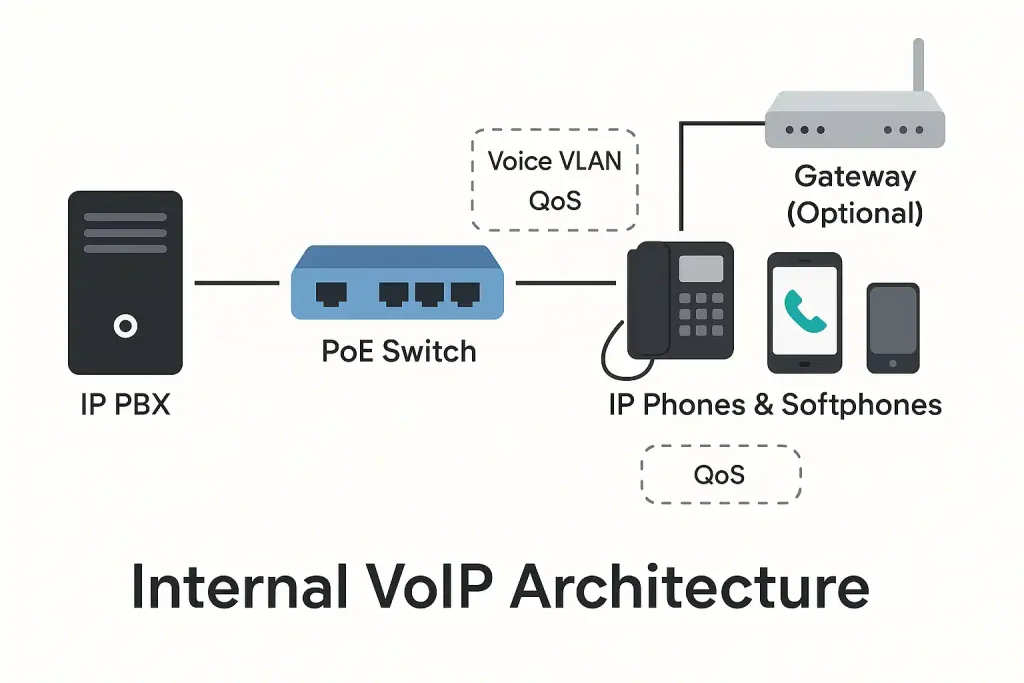
To understand how VoIP can operate without Internet, we look at the LAN‑Based architecture where all calls and signaling stay within the local network, without reliance on Internet connectivity.
Key Components in LAN‑Based Architecture
- IP PBX the network-based telephone switch that manages calls (examples: FreePBX, Asterisk, 3CX).
- VoIP Phones hardware or software endpoints used for internal calls.
- PoE Switch to connect and power IP phones.
- Voice VLAN and QoS to ensure call quality by isolating VoIP traffic and prioritizing audio packets.
- Optional Gateway (FXO/GSM) to connect to external lines if needed.
This architecture enables internal calls with good quality and can operate even when Internet access is unavailable.
Prerequisites for LAN‑Based VoIP
- PoE Switch or PoE adapters to power IP phones.
- Layer 3 capable router/switch to create and manage a Voice VLAN.
- Stable DHCP and DNS services for IP provisioning and device registration.
Internal Bandwidth
- G.711 approximately 80–90 kbps per call.
- G.729 approximately 30–40 kbps per call.
- Recommendation: use G.711 in internal networks with proper QoS.
Server/Appliance for IP PBX + UPS
- A dedicated server or appliance to run the IP PBX (e.g., FreePBX or 3CX).
- Consider RAID or SSD for reliability and speed.
- UPS to prevent service interruption during power outages.
Step‑by‑Step Deployment
Sample Scenario
We have a 40‑person office and want to deploy LAN‑Based internal VoIP to enable internal calls without Internet. Design parameters:
- IP PBX (FreePBX) on a VM with IP 10.20.0.10
- Voice VLAN 20 with 10.20.0.0/24
- Data VLAN 10 with 10.10.0.0/24
- Codec default G.711
- Option 66 for phone provisioning
- DSCP EF=46 for RTP traffic
- Extensions 200–299 (sales 21x, support 22x, finance 23x)
1) Plan Numbers and Policies
What to do?
- Define internal ranges, groups, queues, access rights and call rules.
Quick Checklist
- Internal extensions: 200–299
- Ring Group: Sales 620, Support 630
- Call Queue: Center 640
- IVR: 700 (menu)
- Outbound policy: internal calls allowed; external calls via FXO/GSM Gateway if needed
Real‑world Example
- Sales staff has internal 213 and is member of Ring Group 620
- Support internal 221–229 member of Queue 640
2) LAN Preparation: Voice VLAN, QoS, DHCP Option 66
What to do?
- Create a dedicated Voice VLAN, enable QoS and configure DHCP Option 66 to point phones to the provisioning server
Quick Checklist
- VLAN 20 and DHCP scope 10.20.0.0/24; Gateway 10.20.0.1
- Reserve PBX IP 10.20.0.10
- DHCP Option 66 to http://10.20.0.10/provisioning/
- QoS: trust DSCP on EF=46 for RTP
- PoE ports on VLAN 20 (access); trunk link to router/core switch
Conceptual Cisco‑style configuration – summary
vlan 20
interface vlan20
ip address 10.20.0.1 255.255.255.0
ip dhcp pool VOICE
network 10.20.0.0 255.255.255.0
option 66 ascii http://10.20.0.10/provisioning/
mls qos
! QoS globally
! On phone ports: interface gi1/0/5
switchport access vlan 20
mls qos trust dscp
3) Install IP PBX (Asterisk/FreePBX/3CX)
What to do?
- Install FreePBX on a VM and fix the network settings
Checklist
- Static IP 10.20.0.10/24, GW 10.20.0.1, DNS 10.20.0.5
- Enable SIP/PJSIP on default ports (5060/5061)
- Choose codecs G.711 (priority)
- Configure NTP for time synchronization
Example
- In FreePBX: Asterisk SIP Settings -> Bind Address = 10.20.0.10; codecs ulaw, alaw enabled
4) Create Extensions and Register IP Phones/Softphones
What to do?
- Create extensions and register phones automatically or manually
Checklist
- Extensions such as 201, 202, 213, 221...
- Enable provisioning; place config files in the Option 66 provisioning path
- Phones receive IP from VLAN 20 and register automatically; manual setup if needed
Example
- Extension 213 (Sales) on a Yealink T31P with PoE, after obtaining IP from VLAN20, registers via http://10.20.0.10/provisioning/213.cfg
5) Configure Dial Plan, Groups, IVR
What to do?
- Implement internal dialing, group ringing and IVR menus
Checklist
- Internal Dial: 2XX pattern for direct internal calls
- Ring Group 620 includes 21x (Sales)
- Queue 640 members 22x (Support) with hold music
- IVR 700 with keys 1, 2, 3 routing to different destinations
Real‑world Example
- Internal 213 calls IVR 700 and presses 2 to reach queue 640
6) Quality Testing, Documentation and Backup
What to do?
- Perform a test call and document the settings
Quality Checklist
- Echo Test, jitter < 30 ms, packet loss < 1%, one‑way delay < 150 ms, MOS > 4.0
Internal monitoring
- SNMP on switches for port status and PoE; PBX logs and RTCP statistics
Documentation and Backup
- Weekly full backup from FreePBX to NAS; store VLAN/QoS diagrams and extension lists
Example
- After deployment, calls between 213 and 221 work; Echo, jitter and loss are within acceptable ranges; MOS 4.3; weekly backup is stored on NAS
Pro Tips
- If you also have a mobile softphone, create a separate SSID for Wi‑Fi voice on the same VLAN 20 and enable WMM/QoS
- Enable LLDP‑MED on switches and phones for automatic VoIP VLAN discovery
- Keep Voice VLAN separate from Data VLAN; enable ACLs between VLANs and DHCP Snooping on switches
Conclusion
VoIP does not have to rely on Internet; it can be implemented as an internal LAN‑Based system to manage internal calls with high quality and lower cost. Using IP PBX, PoE switches, Voice VLAN and QoS contributes to stable and secure calls, and internal communication remains available even when Internet access is lost. Organizations aiming to reduce costs and improve internal communications can benefit from deploying an internal VoIP structure. For design accuracy, security and long‑term maintenance, collaborating with a team specializing in VoIP phone system support can play a key role.
Does VoIP Work Without Internet?
Yes. If VoIP is implemented as an internal LAN‑Based system, calls occur only on the local network and do not depend on Internet connectivity.
What equipment is needed to deploy LAN‑Based VoIP?
An IP PBX (e.g., FreePBX or 3CX), a PoE switch or PoE adapters, VoIP phones and a stable LAN.
If Internet is down, do calls fail?
No. Internal calls continue to operate. External calls require Internet access or a gateway.
برای ارزیابی پایداری، امنیت و نگهداری این زیرساخت، راهنمای پشتیبانی شبکه را نیز مطالعه کنید.