How to Control a CCTV Camera from Your Mobile: A Complete Visual Guide
Learn how to control CCTV cameras from a mobile device using secure, practical methods. This guide covers using manufacturer apps, mobile browsers, cloud services, and DVR/NVR access, along with security tips and troubleshooting.
خلاصه تخصصی مقاله
Learn how to control CCTV cameras from a mobile device using secure, practical methods. This guide covers using manufacturer apps, mobile browsers, cloud services, and DVR/NVR access, along with security tips and troubleshooting.
موضوعات اصلی: پشتیبانی شبکه، دوربین، کنید، اتصال، استفاده، دسترسی
Today, access to CCTV footage via mobile has become a core need for homes and businesses. Imagine you are traveling and want to check the status of your home or workplace with just a few taps on your phone; this capability not only provides peace of mind but also enhances security. In this guide, we review secure and efficient ways to connect a mobile device to a CCTV camera and share tips to access live and recorded footage safely. If you need installation or upgrades, consulting with a professional team can be a good decision.
Types of connections to CCTV cameras via mobile
To view footage from anywhere, there are several main methods, each with its own advantages and limitations.
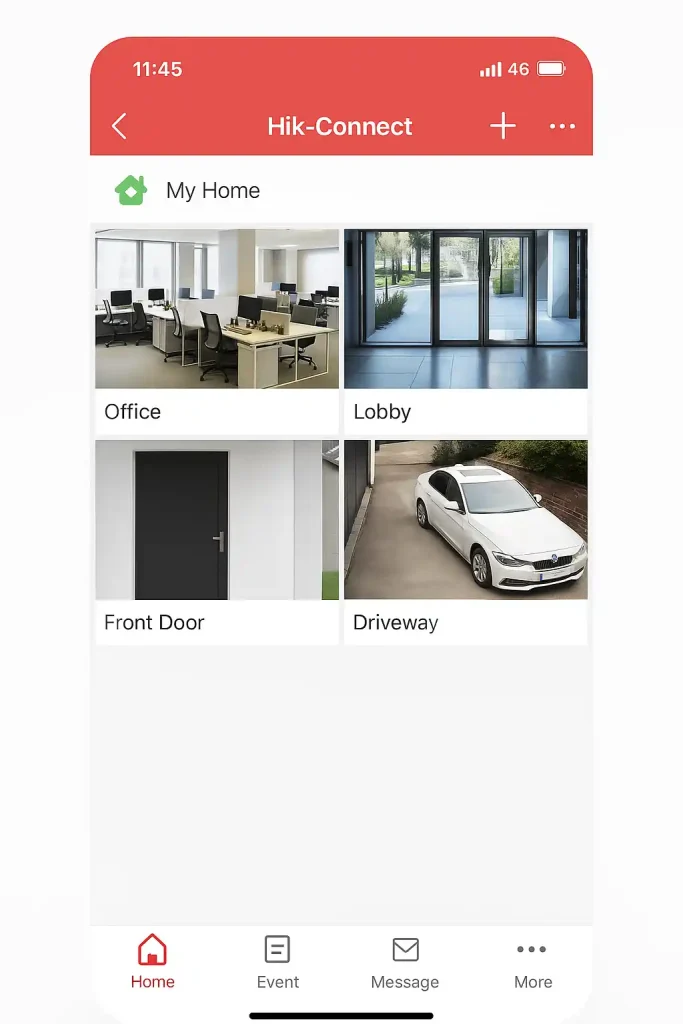
1. Through the camera manufacturer’s dedicated app
Many reputable brands offer official apps that enable live viewing, playback, and recording management.
- Pros user-friendly interface, adequate security, support for core camera features
- Exampleofficial apps provided by the camera maker
2. Through the mobile browser with a fixed IP or DDNS
In this method, you access the system by entering the camera's IP address or a dynamic DDNS domain in the mobile browser.
- Pros no need to install an app
- Cons security is generally lower than official apps and requires port forwarding configuration
3. Through cloud services
Some systems store and stream footage to cloud servers. With a username and password, you can access from any device.
- Pros no fixed IP needed; data is encrypted for security
- Examplecloud services offered by brands
4. Connecting to DVR or NVR via mobile app
If you use a DVR or NVR, install the mobile app compatible with the device and add the device by scanning a QR code or entering IP and port manually.
- Pros manage multiple cameras from a single app
- Examplemanagement apps for DVR/NVR
Prerequisites before connecting
Before connecting, perform several essential steps to ensure a smooth setup.
- Properly connect camera and recording device to the network
The DVR/NVR should be connected to the modem via Ethernet or Wi‑Fi. - Assign a static IP to DVR/NVR
Set a fixed IP to prevent IP changes after modem or device restart. - Enable remote access
Enable options such as P2P or DDNS for easier mobile access. - Install and update software
Make sure the device’s official app is installed and up to date. - Configure security
Change default passwords and use strong credentials.
Step-by-step setup to connect CCTV camera with mobile
Next are the main steps to connect to the camera via mobile.
- Step 1: Download and install the appropriate app
Get the official app from the device maker or recorder provider. - Step 2: Create a user account
Create a new account or sign in with an existing one; provide a valid email or mobile number. - Step 3: Add the device to the app
Go to the Add Device section and choose to scan a QR code on the device or enter IP and port manually. - Step 4: Configure network settings
If using internet, enable Port Forwarding or use P2P/DDNS options. - Step 5: Test the connection and view live feed
Save the information and access the device in the app to check the live view.
Security tips to prevent camera hacks
For secure mobile access, follow these tips to minimize the risk of unauthorized access.
- Change default passwords
Use strong passwords and avoid defaults. - Enable two-factor authentication
Many camera management apps offer 2FA for extra security. - Regular updates
Keep firmware and apps up to date to apply security patches. - Limit exposure via port forwarding
If using Port Forwarding, restrict to trusted IPs or geographic ranges. - Use a secure network or VPN
When accessing from outside the local network, use a VPN to encrypt traffic.
Common problems and solutions
| Common Issue | Possible Cause | Recommended Action |
|---|---|---|
| Unable to connect mobile to camera | Internet connectivity or app configuration | Check internet connection and IP/Port settings |
| Black image or no image | Lens issue, firmware problem, or cable | Clean lens, update firmware, check cables |
| No notifications | Notifications disabled in app or mobile | Enable notifications in app/mobile settings |
| Latency in live view | Insufficient bandwidth or busy network | Use faster internet or lower resolution |
| QR code scan error | Camera quality or damaged label | Provide adequate light, enter serial manually |
| No recording on memory card | Card full or incompatible | Format card or use a higher-class card |
| Audio cut out | Microphone disabled | Enable microphone in app settings |
| Camera reset | Power or electrical noise | Use original power supply, check cables |
| Connection fails after update | App or firmware mismatch | Install older version or update both to latest |
| Unauthorized access detected | Weak password or no 2FA | Change password, enable 2FA, review access logs |
Conclusion
Accessing CCTV cameras from a mobile device simplifies management and monitoring, and enables quick responses in emergencies. By following prerequisites, proper configuration, and security practices, you can ensure secure and stable transmission of footage. If you lack technical expertise, professional installation and configuration services are recommended.
Frequently Asked Questions
- 1. Is high-speed Internet required to connect to a CCTV camera?
Yes, for live viewing without interruptions, use an Internet connection with at least 2 Mbps.
- 2. Can multiple users access the same camera simultaneously?
Most monitoring apps support this, but there may be practical limits on concurrency.
- 3. What if the camera password is forgotten?
You can reset the password via a physical reset button on the device or through app settings, then reconfigure.
- 4. Is remote access to the camera secure?
It can be secure when using a strong password, keeping firmware updated, and employing encryption protocols.
برای ارزیابی پایداری، امنیت و نگهداری این زیرساخت، راهنمای پشتیبانی شبکه را نیز مطالعه کنید.