Configuring SIP Trunk to Connect VoIP to PSTN Lines: A Practical Guide for Businesses
This technical guide explains SIP Trunk, its differences from traditional lines, and practical steps for configuration, network and security considerations, and common troubleshooting for enterprise deployments.
خلاصه تخصصی مقاله
This technical guide explains SIP Trunk, its differences from traditional lines, and practical steps for configuration, network and security considerations, and common troubleshooting for enterprise deployments.
موضوعات اصلی: پشتیبانی شبکه، فایروال، SIP، Trunk، تماس، VoIP
Table of Contents
- Introduction
- What is SIP Trunk and how does it differ from traditional lines?
- What is SIP Trunk used for in VoIP?
- What equipment is needed for SIP Trunk?
- Practical steps to deploy SIP Trunk in an organization
- Table of advantages and challenges
- Common SIP Trunk connectivity issues and how to fix them
- Conclusion
- FAQ
Introduction
As VoIP-based telephony becomes more prevalent in organizations, connecting these systems to PSTN lines presents a technical challenge. Configuring a SIP Trunk is one of the main methods to connect an internal VoIP network to the public telecom network, with a focus on call quality, reliability and security.
This practical guide explains what a SIP Trunk is, how to configure it correctly, necessary network and firewall settings, and common connectivity problems in enterprises and how to resolve them.
What is SIP Trunk and how does it differ from traditional lines?
A SIP Trunk is a channel that connects an organization’s VoIP system to the public switched telephone network (PSTN) over the Internet or an IP network. Unlike traditional analog lines that require physical cabling, SIP Trunk carries calls over IP, reducing costs and enabling scalability and flexibility.
Traditionally, each incoming or outgoing call required a physical line. With SIP, a single network connection can support dozens or hundreds of concurrent calls.
Key differences between SIP Trunk and traditional lines
| Feature | Traditional Lines | SIP Trunk |
|---|---|---|
| Connection type | Analog (POTS) | Digital (IP-based) |
| Need for physical hardware | High | Very low |
| Call costs | Typically high | More cost-effective, especially for intercity/international |
| Scalability | Limited | Flexible and scalable |
| Support for video/data | No | Yes, integrated with voice |
Using SIP Trunk reduces costs and can improve call quality when the network infrastructure is properly designed.
SIP Trunk in VoIP: Applications
SIP Trunk serves as the bridge between the organization’s IP-based telephones and the PSTN. Without SIP Trunk, a VoIP system would only support internal or intra-network calls.
Common SIP Trunk applications include:
- Inbound and outbound city calls— receive and place calls to city lines without analog lines.
- Increased concurrent calls— multiple calls over a single IP connection.
- Integration with contact centers and IVR— external connectivity for customer service lines.
- Cost reduction for long-distance and international calls
- Centralized call management— manage all branches from a central VoIP system.
In short, SIP Trunk is essential for professional VoIP implementations and affects call quality, reliability and security.
What equipment is needed for SIP Trunk?
To deploy SIP Trunk reliably, you need more than just an Internet connection. A set of networking and telephony devices is required to ensure call quality and security.
Main equipment for SIP Trunk
| Equipment | Role | Practical notes |
|---|---|---|
| Stable Internet with fixed IP | Underpin SIP Trunk | Call quality depends on Internet stability; fixed IP helps with registration continuity |
| IP-PBX or VoIP Server | Call management | Systems like IP-PBX where the SIP Trunk is defined |
| VoIP-capable router/firewall | NAT control and security | Must support SIP, RTP, QoS and VoIP-friendly NAT |
| Managed network switch | Audio traffic management | QoS capability to prioritize VoIP |
| IP phones or softphones | User calls | VoIP hardware or software endpoints |
| VoIP gateway | Connect to legacy systems | For organizations with analog phones or traditional PBXs |
| Uninterruptible Power Supply (UPS) | Prevent call drops | Power loss without UPS can terminate SIP calls |
Practical steps to deploy SIP Trunk
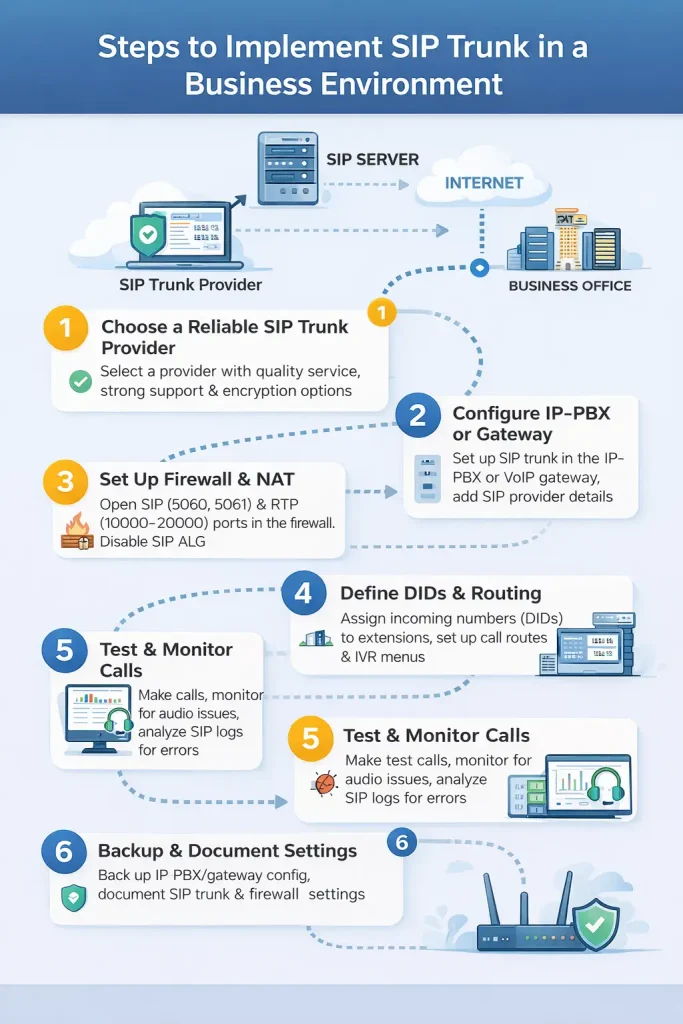
Successful SIP Trunk deployment requires careful configuration at the network, firewall and telephony system levels. The main steps are:
1. Choose a reliable SIP Trunk provider
Select a provider with high-quality call capability, strong support and compatibility with your VoIP equipment. Ensure TLS/SRTP encryption support.
2. Configure IP-PBX or Gateway
In IP-PBX environments, define a new trunk and configure the SIP Server address, authentication details and codecs (e.g., G.711 or G.729).
3. Firewall and NAT configuration
To prevent call drops or one-way audio, open the required ports (e.g., 5060 for SIP and 10000–20000 for RTP) and use NAT suitable for VoIP.
Firewall and NAT settings for SIP Trunk
Incorrect firewall or NAT settings are a common cause of voice issues. Even with proper equipment, misconfigurations can lead to unstable SIP connections.
Role of firewall and NAT in SIP Trunk
- Firewall: filters SIP and RTP traffic.
- NAT: translates private IPs to public; improper setup breaks RTP delivery.
Therefore, SIP Trunk is sensitive to NAT and requires precise configuration.
Ports required for SIP Trunk
| Traffic type | Common port | Explanation |
|---|---|---|
| SIP Signaling | 5060 (UDP/TCP) | Call setup and control |
| SIP Secure | 5061 (TLS) | Secure SIP |
| RTP (audio) | 10000–20000 (UDP) | Voice payload |
| STUN (optional) | 3478 (UDP) | Public IP discovery in NAT |
All these ports should be forwarded to the IP-PBX or gateway.
Essential NAT configurations for SIP Trunk
To avoid common VoIP issues, apply the following:
- Assign a stable internal IP to the IP-PBX
- Define the correct External/Public IP in PBX settings
- Disable SIP ALG on the router/firewall
- Configure NAT as Full Cone or static NAT where possible
SIP ALG is a common cause of SIP problems and should be disabled.
4. Define numbers (DID)
Inbound numbers should map to internal extensions; plan for IVR, call queues and routing.
5. Testing and monitoring
After deployment, test inbound and outbound calls and use monitoring tools to verify call setup and quality.
6. Backup and recovery
Before applying major changes, back up IP-PBX and gateway configurations to enable quick rollback.
Table of advantages and challenges
| Advantages | Details |
|---|---|
| Reduced call costs | Internet-based connectivity lowers charges compared with traditional lines. |
| High scalability | Scale up or down without new physical hardware. |
| Fast deployment | Configure software rather than heavy cabling or hardware changes. |
| Centralized call management | Manage inbound/outbound calls from a single point. |
| Compatibility with modern VoIP systems | Direct connectivity to IP-PBX, softphones and professional firewalls. |
| Support for multiple DID numbers | Receive several numbers on a single SIP connection. |
Challenges
| Challenges | Details |
|---|---|
| Need for stable, high-quality Internet | Outages or latency disrupt calls. |
| Dependence on precise firewall and NAT settings | Misconfigurations can block voice or cause call drops. |
| Complexity of troubleshooting | Diagnosing issues requires expertise and monitoring tools. |
| Possible incompatibilities with some providers | Not all providers are compatible with all VoIP setups. |
| Security concerns such as SIP Hijacking | Without proper firewall and security measures, risk exists. |
Common SIP Trunk connectivity issues and fixes
1. SIP Trunk not registered on PBX
Recheck server address, credentials and port; ensure NAT allows SIP traffic.
2. Call drops after a few seconds
Verify RTP/Session Timer settings and firewall allowances for RTP.
3. One-way audio
Check NAT, consider STUN/TURN and open RTP range in firewall (e.g., 10000–20000).
4. No inbound calls
Review inbound route/NDD registration and DID mapping.
5. Outbound calls issue
Inspect outbound route and dial patterns; ensure trunk is active.
6. Poor call quality
Enable QoS for VoIP traffic, choose appropriate codecs and verify network gear.
7. SIP Trunk drops after restart or at specific times
Check registration expiry, assign a static IP to PBX and review firewall/NAT rules over time.
Conclusion
SIP Trunk is a vital component of enterprise VoIP systems; misconfigurations can lead to dropped calls or degraded quality. Properly configuring SIP, firewall, NAT and call routing enables reliable and secure connections to city lines. In organizations with well-designed network and VoIP infrastructure, SIP Trunk not only reduces costs but also enhances scalability and control over communications.
For assessing stability, security and maintenance of this infrastructure, studying the network support guide is recommended.
FAQ
1. How SIP Trunk differs from traditional city lines?
SIP Trunk uses the Internet to transport calls, whereas traditional lines rely on physical telecom infrastructure.
2. Do you need a modem or special equipment to deploy SIP Trunk?
Yes, IP-PBX or routers with SIP support and a stable Internet connection are required.
3. Why do calls drop after a restart?
Common causes include misconfigured NAT, firewall issues, or codec incompatibilities.
برای ارزیابی پایداری، امنیت و نگهداری این زیرساخت، راهنمای پشتیبانی شبکه را نیز مطالعه کنید.