How misconfiguring Port Security can disconnect users
This article explains why Port Security misconfigurations can disconnect legitimate users and outlines practical steps to configure this feature securely and reliably.
خلاصه تخصصی مقاله
This article explains why Port Security misconfigurations can disconnect legitimate users and outlines practical steps to configure this feature securely and reliably.
موضوعات اصلی: port، Security، can، MAC، aging، network
Introduction
Port Security on switches is designed to prevent unauthorized access to organizational resources by restricting which devices can connect to a given port. If misconfigured, it can have the opposite effect, disrupting legitimate users. For example, choosing the wrong mode or overly restricting MAC addresses can block a legitimate user from the network.
What Port Security is and why it is used
Port Security is a security feature on Layer 2 and Layer 3 switches that allows administrators to specify which devices may connect through a specific port. It typically uses MAC addresses; any device whose MAC is not defined or exceeds the allowed limit can be blocked.
- Preventing MAC flooding - An attacker may flood with fake MACs, filling the switch's MAC table. Port Security blocks such activity.
- Restricting access - Only authorized devices can connect to the port.
- Controlling multiple devices on a single port - Sometimes a user needs to connect both a PC and a VoIP phone; Port Security must be configured correctly to allow this.
- Enhancing network security - Physical access to ports does not automatically grant network access.
In short, Port Security is an important tool for network security; however, misconfiguration can undermine security and block legitimate users.
Problems caused by misconfiguration
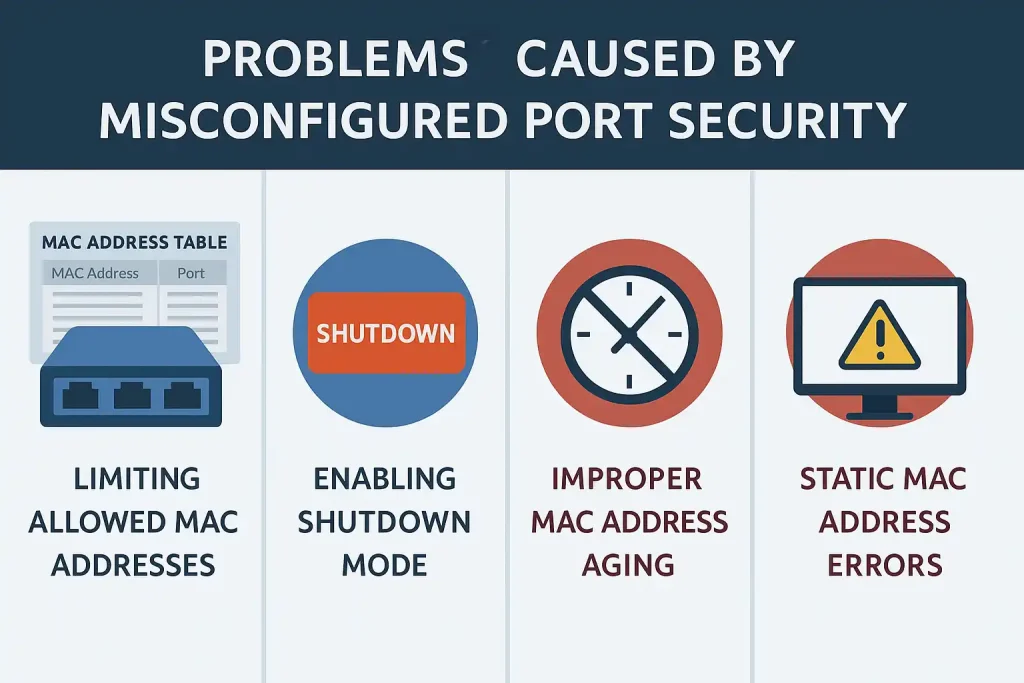
Misconfiguration of Port Security can lead to legitimate user disconnects and network disruption. Common errors include:
1. Over-restricting the number of MAC addresses
- If only a single MAC address is allowed per port and the user needs multiple devices, one device will be blocked.
- Common in environments using IP phones.
2. Using Shutdown instead of Restrict or Protect
- Shutdown moves the port to an err-disabled state on violation.
- All user connectivity is lost, and an admin must re-enable the port.
- Suitable for sensitive environments but not for daily offices.
3. Incorrect aging configuration for MAC addresses
- MAC addresses can be cached for a period of time.
- If aging is set too long, users who moved may not reconnect to the new port.
- If aging is too short, users experience frequent disconnects.
4. Common errors in static MAC binding
- Manually binding a MAC to a port can cause disconnects if the device is replaced or moved.
- Common in organizations that replace hardware over time.
5. Lack of monitoring violations
- Many admins enable Port Security but do not monitor logs or violations.
- As a result, the disconnect problem recurs without root cause being identified.
Troubleshooting Port Security
When users disconnect due to misconfiguration, admins should identify and resolve the issue step by step. The following steps serve as a practical checklist:
1. Check port status with CLI
- On various switches, checking port status and Port Security violations can reveal the number of allowed MACs, the registered MACs, and the violation type.
2. Check logs and error messages (Syslog)
- Messages such as PORT_SECURITY-2-PSECURE_VIOLATION indicate a port was blocked due to violations.
- Monitoring Syslog or SIEM tools helps identify the error source faster.
3. Check Violation mode
- Port Security has three main modes: Protect, Restrict, and Shutdown.
- If the mode is Shutdown, the port should be reset accordingly.
4. Check the number of allowed MAC addresses
- Review the number of registered MACs. If more than allowed, increase the maximum or remove extra MACs.
5. Check aging for MAC addresses
- If users are moved, aging should be defined appropriately (e.g., inactivity aging).
- This ensures MACs are cleared after a period of inactivity, allowing reconnection.
Best practices for Port Security configuration
To make Port Security an effective security layer rather than a source of problems, configure it carefully and based on real needs. Four key principles:
Choose the right mode (Protect or Restrict instead of Shutdown)
- Shutdown disables the port on violation, increasing security but risking frequent disconnects.
- Recommendation: use Restrict or Protect to reduce the risk of user disconnects.
Define the number of allowed MAC addresses per real user needs
- Some users connect only one device, but in environments like Call Centers or VoIP-enabled spaces, multiple devices on one port may be needed.
- Setting too low a value may block legitimate access.
- Best practice: set 2 or 3 MACs per port based on reality.
Set correct aging to avoid reconnect issues
- Long aging can cause issues when moving devices; short aging leads to frequent disconnects.
- Recommendation: use Inactivity Aging with an appropriate duration (e.g., 5 minutes).
Documentation and testing before applying network-wide
- Applying Port Security across all switches without testing is risky.
- Recommendation: test in a limited environment, document the results, then apply network-wide.
Configuration table
| Configuration Principle | Explanation | Practical Recommendation |
|---|---|---|
| Choose the right mode | Shutdown disables the entire port and can cause full disconnects. | Use Restrict or Protect to lower the risk of user disconnects. |
| MAC address limit | Over-restricting can block legitimate access. | Set 2 or 3 MACs for shared ports (such as VoIP + PC). |
| Set aging correctly | Very long or very short aging causes connectivity problems. | Use Inactivity Aging with a suitable duration (e.g., 5 minutes). |
| Documentation and testing | Applying directly across the network can be risky. | Test in a limited environment → document results → apply network-wide. |
Conclusion
Port Security is one of the key tools for controlling physical access and preventing network attacks such as MAC flooding. When configured correctly, it can contribute to network security; however, misconfiguration can lead to disconnections of legitimate users, service disruption, and increased IT workload. To avoid these issues, admins should carefully choose the mode, set a realistic MAC limit, configure aging properly, and maintain thorough documentation. Continuous monitoring of logs and testing before applying changes across the organization helps prevent unwanted outages. Port Security yields its best results when used alongside other security layers and with collaboration from network support teams.
What is the main reason for user disconnections due to Port Security?
The most common reason is over-restricting MAC addresses and using Shutdown mode, which blocks legitimate devices.
Aging in Port Security what is its purpose?
Aging determines how long a MAC address remains on the port. If set incorrectly, it can prevent reconnection or cause frequent disconnects.
Can Port Security be enabled on all network ports?
Technically yes, but it is recommended to enable on access ports and configure with care on trunks or servers.
How Port Security differs from 802.1X?
Port Security controls access by MAC address, while 802.1X authenticates user and device. Using both can provide higher security.
برای ارزیابی پایداری، امنیت و نگهداری این زیرساخت، راهنمای پشتیبانی شبکه را نیز مطالعه کنید.