Reducing connectivity disruption caused by MAC Address Table saturation in switches
MAC Address Table saturation on switches can lead to user disconnections from servers or the Internet in organizational networks. This article outlines symptoms, troubleshooting steps, and preventative measures to maintain network stability.
خلاصه تخصصی مقاله
MAC Address Table saturation on switches can lead to user disconnections from servers or the Internet in organizational networks. This article outlines symptoms, troubleshooting steps, and preventative measures to maintain network stability.
موضوعات اصلی: پشتیبانی شبکه، مانیتورینگ شبکه، MAC، سوئیچ، شدن، Table
A network switch uses a table called the MAC Address Table to map device MAC addresses to specific switch ports. When this table fills up, the switch cannot learn new addresses and may broadcast traffic to all ports, reducing efficiency and potentially causing user disconnections from servers or the Internet. Maintaining stability requires monitoring and preventive measures.
What is the MAC Table and why is it important?
The MAC Address Table (also known as CAM Table) stores MAC addresses and the port to which each device is connected. By leveraging this table, the switch forwards traffic directly to the destination, reducing broadcasts and improving network performance. If the table becomes full, new addresses cannot be stored and traffic is broadcast, leading to performance degradation, user disconnects, and higher CPU/memory utilization. Regular monitoring and maintenance are essential.
Signs of MAC Table Saturation
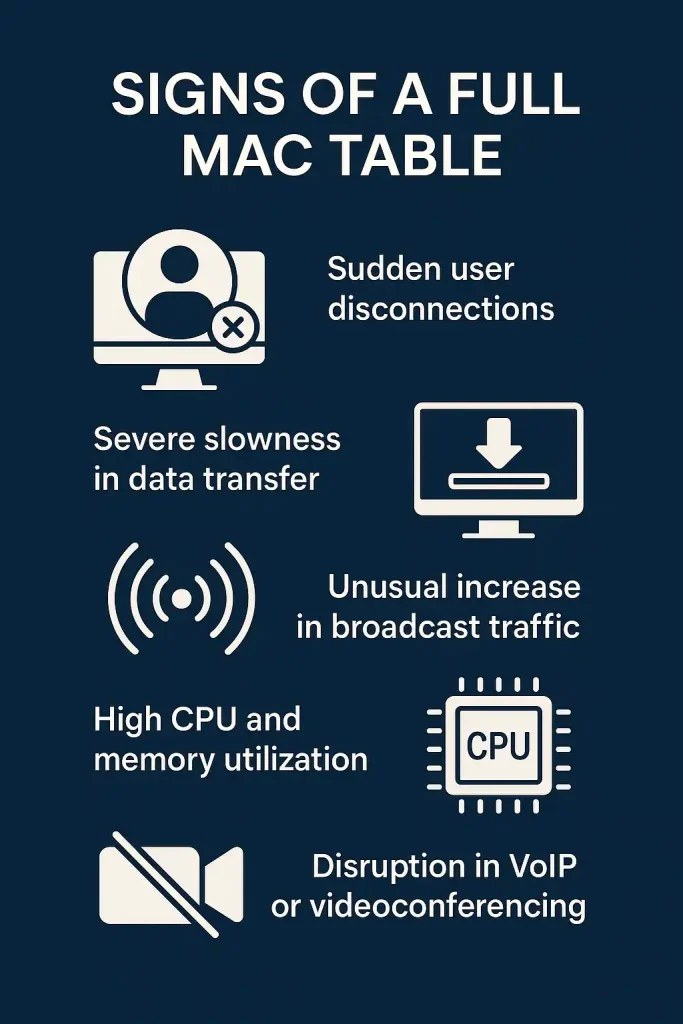
When the MAC Table saturates, you may observe:
- Sudden user disconnections from network resources or Internet access.
- Severe slowdowns in data transfer when accessing shared resources or networked applications.
- Unusually high broadcast traffic on the network.
- Increased CPU and memory usage on the switch.
- Problems with sensitive services such as VoIP or video conferencing.
Troubleshooting MAC Table Saturation
To address saturation, identify symptoms and assess switch status. Key methods include:
1. Check switch logs (Syslog)
Many switches support Syslog. Enabling this feature lets you view port errors, abnormal broadcasts, or high resource usage to determine when saturation occurs.
2. Monitor MAC Table with management commands
On Cisco switches you can view the MAC addresses stored on the switch and the ports they are connected to. If the MAC count is unexpectedly high or frequently changing, saturation or MAC Flooding may be occurring.
3. Inspect high-traffic ports
Often saturation originates from one or more high-traffic ports. Identify these ports and inspect any abnormal connected devices.
4. Identify suspicious devices or users
Sometimes a compromised device rapidly generates many fake MAC addresses. Inspect MACs per port, remove unauthorized devices, and enable Port Security to limit per-port MAC addresses.
Preventive and Remedial Measures
Once identified, implement measures to prevent recurrence.
1. Enable Port Security
- Port Security limits the number of MAC addresses allowed per port, preventing misuse or misconfiguration.
- This helps stop a faulty or malicious device from adding many fake MACs.
2. Implement proper VLAN segmentation
- Separating users into distinct VLANs reduces MAC Table load per VLAN and enhances security.
3. Upgrade switch hardware
- Older or cheaper switches may have limited MAC table capacity; larger networks benefit from switches with higher capacity (e.g., 32k or 64k MACs).
4. Continuous monitoring and alerting
- Network monitoring tools can track MAC Table status in real time and trigger alerts before saturation occurs.
5. Mitigate MAC Flooding attacks
- Use IDS/IPS for Layer 2 threat detection and enable security features like Dynamic ARP Inspection or DHCP Snooping.
Checklist: Preventive actions against MAC Table saturation
| Action | Explanation | Status (✓ / ✗) |
|---|---|---|
| Port Security | Limit the number of MACs per port to prevent attacks or misconfiguration | ✗ |
| VLAN segmentation | Divide users into separate VLANs to reduce MAC Table load and improve security | ✗ |
| Upgrade switches | Use switches with higher MAC capacity (32k or 64k) for large networks | ✗ |
| Continuous monitoring | Monitor MAC Table status in real time and set preemptive alerts | ✗ |
| Attack mitigation | Enable IDS/IPS, DHCP Snooping, and Dynamic ARP Inspection | ✗ |
Conclusion
MAC Table saturation on switches is a significant cause of connectivity issues in organizational networks. Timely symptom detection, thorough log analysis, and applying measures such as Port Security, well-planned VLANs, and continuous monitoring play a crucial role in preventing and mitigating this problem. For stability, consider engaging specialized network support or consulting services.
Impact of MAC Table Saturation on the network
When the MAC Table is full, the switch cannot store new addresses and forwards traffic to all ports, leading to slower performance, user disruptions, and increased processing load on the switch.
How to confirm that saturation is the cause?
Review switch logs, run commands to view the MAC table, and watch for abnormal broadcasts or high CPU usage to confirm saturation.
Can MAC Table saturation result from an attack?
Yes, MAC Flooding Attacks are a common Layer 2 threat that can rapidly saturate the MAC Table, typically to eavesdrop or disrupt access.
What is the best way to prevent MAC Table saturation?
The key measures include enabling Port Security, implementing proper VLAN segmentation, upgrading switch hardware, and maintaining continuous network monitoring.
برای ارزیابی پایداری، امنیت و نگهداری این زیرساخت، راهنمای پشتیبانی شبکه را نیز مطالعه کنید.