Managing and Updating Organizational Software to Strengthen Security
This article explores practical approaches for managing and updating organizational software to mitigate contemporary security threats and maintain system stability.
خلاصه تخصصی مقاله
This article explores practical approaches for managing and updating organizational software to mitigate contemporary security threats and maintain system stability.
موضوعات اصلی: updates، Software، security، update، Phase، should
Why Is Software Updating Essential?
Regular updates are a key measure for protecting data integrity, improving software performance, and ensuring compatibility across the network. Outdated software often contains vulnerabilities that attackers can exploit. Therefore, applying updates in a systematic and managed way can enhance security and reliability.
Common Security Threats in Older Software
Older software that is not updated may harbor known vulnerabilities that pave the way for attackers. Typical threats include ransomware, backdoor access, data breaches, and malware injection.
| Threat Type | Explanation | Real-world Example |
|---|---|---|
| Ransomware | Encrypts data and demands payment for restoration | WannaCry attacks |
| Backdoor Access | Hidden unauthorized access to systems | Exploitation of common vulnerabilities |
| Data Breach | Theft of sensitive data from databases | Notable data leaks |
| Malware Injection | Injecting malware through outdated components | Exploitable outdated plugins |
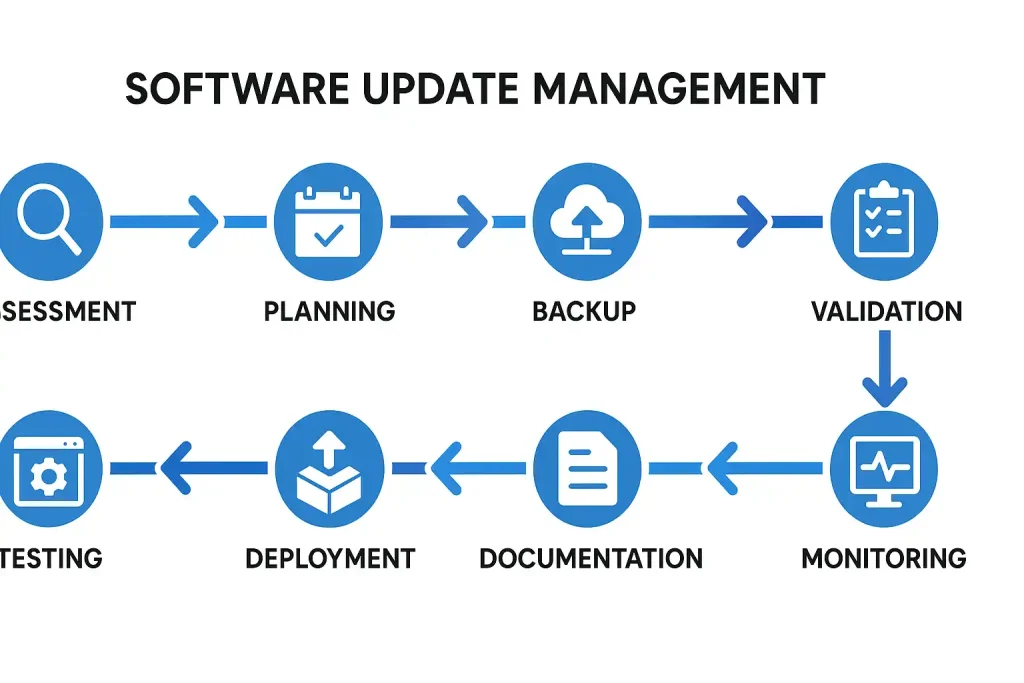
How Updates Are Applied
1. Assessment Phase
The initial step is to assess the current software status and identify outdated or vulnerable versions. Patch management tools can be used for this task. In this phase you should:
- Identify critical software assets
- Determine the type of update (security, feature, or bug fix)
- Assess the importance of each update based on its impact on security or operations
Automating vulnerability assessments can increase response speed to threats.
2. Planning Phase
Before taking action, develop a detailed, time-bound plan for applying updates. In this phase consider:
- Apply updates during off-hours to minimize productivity impact
- Notify staff and network users about upcoming updates
- Keep the technical team ready to respond to potential issues
Updates are typically documented as change requests and implemented after IT approval.
3. Testing Phase
Before full deployment, test the update in a controlled environment. In this environment you can:
- Assess patch compatibility with other software
- Evaluate potential impact on system performance
- Identify risks such as installation errors or antivirus interference
This phase helps prevent large-scale issues in production and reduces remediation costs.
4. Backup Phase
Back up critical data and configurations before making changes. Best practices include:
- Using image-based backups for full system recovery
- Storing backups in a secure location or cloud storage
- Conducting restore tests to verify backup integrity
Having a backup before updates is essential.
5. Deployment Phase
Proceed to apply updates in the production environment with key considerations:
- Prioritize updates (security first, then feature updates)
- Monitor the installation process to prevent errors
- Document successful or failed installations for each system
In large networks, centralized patch management tools are commonly used.
6. Validation Phase
After installation, verify that services operate correctly and that the network remains stable. Key activities:
- Test network connectivity and service availability
- Review logs for errors
- Evaluate software performance and reliability
Software compatibility with network equipment and operating systems is also checked.
7. Documentation Phase
All steps should be documented to provide a reliable reference for future updates or troubleshooting. Record:
- Software versions before and after the update
- Timestamp and person responsible for the patch
- Issues and resolutions
These details aid security audits and compliance.
8. Continuous Monitoring
Update management is an ongoing process. Use security monitoring tools to continuously track software status, review logs for post-update errors, receive security alerts from official sources, and schedule updates according to IT policy.
Conclusion and Final Recommendations
Regular and precise software updates are a key component of maintaining security, performance, and stability of organizational systems. Organizations should adopt a systematic and preventive approach to updates. Timely identification, testing in controlled environments, backups, and continuous monitoring are essential.
Key Recommendations
- Establish a regular update program Schedule periodic checks and installations.
- Leverage professional services Collaborating with network support teams can make the process safer and easier.
- Educate staff Raise awareness about update importance and how to report issues.
- Use automated management tools Automated update management helps speed up processes and reduce errors.
- Monitor emerging threats Continuous vigilance over cybersecurity trends enables proactive defense.
With the practices above, you can ensure the security and resilience of organizational systems and turn your IT infrastructure into a growth-enabling asset.
How Often Should We Update?
Depends on the software type and security sensitivity. Critical and network-facing software should be checked at least monthly and updated if security patches are available. Some systems such as antivirus or firewalls may require weekly or daily updates.
Should all updates be installed immediately?
No. Updates should be tested in a test environment before installation to ensure compatibility and avoid disruptions.
What is the difference between security patches and feature updates?
Security patches fix vulnerabilities and should be prioritized. Feature updates add new capabilities or improve performance and are usually installed less frequently.
What if an update causes an error?
If errors occur, revert to a backup. This is why backing up before any update is essential.
برای ارزیابی پایداری، امنیت و نگهداری این زیرساخت، راهنمای پشتیبانی شبکه را نیز مطالعه کنید.